---
title: "Defold Sprite Sheets: Export a Tile Source and Animation"
description: "Export a Defold Tile Source (.tilesource) with tile size, margin, spacing, and a looping animation already set. Import the PNG, use nearest filtering, and play the flipbook."
canonical_url: "https://spritesheetgenerator.online/engines/defold"
meta:
author: "Dennis Postma"
"og:description": "Export a Defold Tile Source (.tilesource) with tile size, margin, spacing, and a looping animation already set. Import the PNG, use nearest filtering, and play the flipbook."
"og:image": "https://spritesheetgenerator.online/og-image.png"
"og:image:alt": "Spritesheet Generator editor showing sprites arranged on a sheet grid"
"og:title": "Defold Sprite Sheets: Export a Tile Source and Animation"
"twitter:image": "https://spritesheetgenerator.online/og-image.png"
"twitter:image:alt": "Spritesheet Generator editor showing sprites arranged on a sheet grid"
---
> Index of every page on this site: [llms.txt](https://spritesheetgenerator.online/llms.txt)
DefoldMetadata export
# **Sprite Sheet Generator for Defold**
**The Defold preset writes spritesheet.png and spritesheet.tilesource. The tile size, zero margin and spacing, and a looping default animation are already in the file, so a Sprite component can play it straight away.**
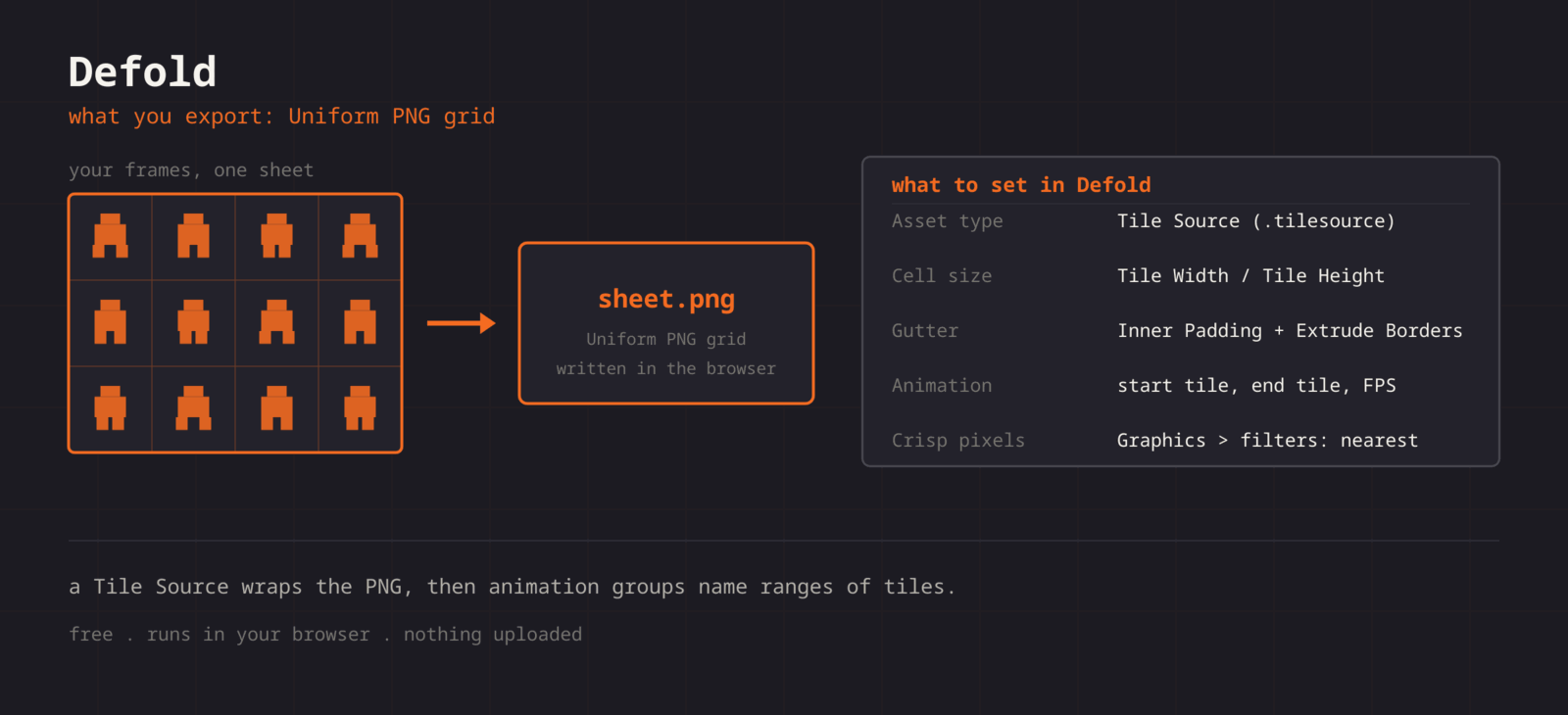
What you export
**Format menu**
**Defold**
Tile Source (.tilesource)
**Format > Defold downloads spritesheet.png and spritesheet.tilesource. The tile source points at /spritesheet.png in the project root, sets Tile Width and Tile Height to the cell size, leaves Tile Margin and Tile Spacing at 0, and defines one looping animation named default from tile 1 to the last frame at 12 FPS. Put the PNG at the project root, or edit the image line to wherever it lives. Inner Padding and Extrude Borders are still yours to set in the editor: they add space around each tile in the texture Defold builds, not in your PNG.**
Step by step
## **Getting the sheet into Defold**
1. **1**### **Export the pair**
Click Format in the Export panel and choose Defold. The ZIP holds spritesheet.png and spritesheet.tilesource.
2. **2**### **Place the files**
Copy spritesheet.png to the project root, where /spritesheet.png points, and the .tilesource wherever you like. If the PNG goes in a subfolder, change the image line in the .tilesource to that path.
3. **3**### **Add a Sprite**
Add a Sprite component to a game object and set Image to the .tilesource. The animation named default is ready to play.
4. **4**### **Play it**
Call sprite.play\_flipbook("#sprite", "default") from a script. Add more animations in the Tile Source editor if the sheet holds more than one.
5. **5**### **Nearest filtering**
In game.project under Graphics, set Default Texture Min Filter and Default Texture Mag Filter to nearest.
Lua
```
function init(self)
sprite.play_flipbook("#sprite", "default")
end
function on_input(self, action_id, action)
if action_id == hash("right") then
sprite.play_flipbook("#sprite", "default")
end
end
```
Cheat sheet
| **Setting** | **Defold value** |
| --- | --- |
| **Import** | PNG at the project root, .tilesource anywhere |
| **Asset type** | Tile Source (.tilesource), written for you |
| **Image** | /spritesheet.png in the project root |
| **Cell size** | Tile Width / Tile Height, already set |
| **Tile Margin / Tile Spacing** | 0, the cells touch |
| **Animation** | default, tiles 1 to frame count, 12 FPS |
| **Crisp pixels** | game.project > Graphics > filters: nearest |
Built for the workflow
### **A ready Tile Source**
The .tilesource is plain text with the image path, tile size, margin, spacing and one animation already filled in. Open it in the editor to add more animations or collision groups.
### **Tile numbers in your order**
Tiles number left to right, top to bottom, the same order you arranged the frames. The generated animation runs from tile 1 to the last frame.
### **Frames for an Atlas too**
The ZIP export writes each frame as its own PNG (frames/frame\_001.png and up), ready to drag into an Atlas if you want Defold to pack and trim them.
Troubleshooting
## **When the sheet fights Defold**
### **play\_flipbook logs that the animation cannot be found**
- **Cause**
- The id passed to play_flipbook has to match an animation Id in the Tile Source exactly. The generated file names its first animation default.
- **Fix**
- **Use sprite.play_flipbook("#sprite", "default") for the generated animation, or open the Tile Source and copy the Id of any animation you added rather than retyping it.**
### **The animation starts on the wrong pose**
- **Cause**
- Tile numbers in a Tile Source start at 1, not 0, and run left to right then top to bottom. The generated animation covers tiles 1 to the frame count.
- **Fix**
- **Open the Tile Source and check Start Tile and End Tile. If the sheet holds several animations, split them into separate rows and add one animation per range.**
### **Thin seams appear between tiles in a tilemap**
- **Cause**
- Neighbouring tiles are sampled at their shared edge, and without extrusion the sampler picks up the next tile.
- **Fix**
- **Set Extrude Borders to 1 or 2 in the Tile Source. Defold adds the extrusion when it builds the texture, so the PNG and tile size stay the same.**
### **Pixel art scales unevenly**
- **Cause**
- The game object has a fractional scale, which no filter setting can make even.
- **Fix**
- **Scale game objects, or the camera zoom, by whole numbers only.**
### **Build size grows faster than the art you add**
- **Cause**
- A Tile Source cannot trim, so duplicated frames and wide transparent margins survive into the build.
- **Fix**
- **Drop repeated poses before exporting. If trimming matters more than having one grid image, use an Atlas built from the ZIP frames instead.**
Versions and edge cases
## **Versions and edge cases**
- **Tile Source fields**
- Image, Tile Width, Tile Height, Tile Margin, Tile Spacing, Inner Padding, and Extrude Borders. The Defold export fills in the first five and one animation; Inner Padding and Extrude Borders stay at their defaults until you set them in the editor.
- **Tilemaps**
- A tilemap component needs a Tile Source, not an Atlas, so the grid export is the route for level tiles.
- **Collision from tiles**
- A Tile Source can generate a collision shape per tile from the alpha of a Collision image. Point it at the same PNG and set Collision Groups on the tiles that should block.
Defold FAQ
###
###
###
**More detail in the **[**related guide**](https://spritesheetgenerator.online/guides/import-sprite-sheets-game-engines)**, or compare **[**every export format**](https://spritesheetgenerator.online/features/export-formats)**. **
Other engines
[**Unity**](https://spritesheetgenerator.online/engines/unity "Export a PNG grid with a .meta file that imports it already sliced.") [** Godot**](https://spritesheetgenerator.online/engines/godot "Export a SpriteFrames .tres and assign it to an AnimatedSprite2D.") [** Phaser**](https://spritesheetgenerator.online/engines/phaser "Export a TexturePacker-format JSON atlas and load it with this.load.atlas.") [** PixiJS**](https://spritesheetgenerator.online/engines/pixijs "The same JSON atlas, parsed by Assets.load into a Spritesheet.") [** GameMaker**](https://spritesheetgenerator.online/engines/gamemaker "Export a uniform PNG and split it with Convert to Frames.") [** Construct 3**](https://spritesheetgenerator.online/engines/construct "Export a uniform PNG and import it with Import frames > From sprite strip.") [** Tiled**](https://spritesheetgenerator.online/engines/tiled "Export a .tsj tileset with columns, tile size, and count filled in.") [** FNF & Sparrow**](https://spritesheetgenerator.online/engines/fnf "Sparrow XML atlas for FNF mods, Starling, and HaxeFlixel.")
## **Export for Defold**
**Load your frames, check the loop in the Preview tab, then export. For Defold that means: Tile Source (.tilesource).**
[Open the editor](https://spritesheetgenerator.online/editor) [**All engines**](https://spritesheetgenerator.online/engines)
```json
{"@context":"https://schema.org","@graph":[{"@id":"https://spritesheetgenerator.online/#website","@type":"WebSite","description":"Free online tool to create spritesheets for game development. Upload sprites, arrange them, and export as a spritesheet with animation preview.","name":"Spritesheet Generator","url":"https://spritesheetgenerator.online/","publisher":{"@id":"https://spritesheetgenerator.online/#identity"}},{"@id":"https://spritesheetgenerator.online/engines/defold#webpage","@type":"WebPage","description":"Export a Defold Tile Source (.tilesource) with tile size, margin, spacing, and a looping animation already set. Import the PNG, use nearest filtering, and play the flipbook.","name":"Defold Sprite Sheets: Export a Tile Source and Animation","url":"https://spritesheetgenerator.online/engines/defold","breadcrumb":{"@id":"https://spritesheetgenerator.online/engines/defold#breadcrumb"},"isPartOf":{"@id":"https://spritesheetgenerator.online/#website"},"potentialAction":[{"@type":"ReadAction","target":["https://spritesheetgenerator.online/engines/defold"]}],"primaryImageOfPage":{"@id":"https://spritesheetgenerator.online/#logo"}},{"@id":"https://spritesheetgenerator.online/#identity","@type":"Organization","description":"A free, browser based sprite sheet generator for 2D game developers and pixel artists.","name":"Spritesheet Generator","url":"https://spritesheetgenerator.online","logo":{"@id":"https://spritesheetgenerator.online/#logo"},"sameAs":["https://discord.gg/2vvfqwn5k7"]},{"@id":"https://spritesheetgenerator.online/engines/defold#breadcrumb","@type":"BreadcrumbList","itemListElement":[{"@type":"ListItem","name":"Home","item":"https://spritesheetgenerator.online","position":1},{"@type":"ListItem","name":"Engines","item":"https://spritesheetgenerator.online/engines","position":2},{"@type":"ListItem","name":"Defold","item":"https://spritesheetgenerator.online/engines/defold","position":3}]},{"@id":"https://spritesheetgenerator.online/engines/defold#/schema/question/1","@type":"Question","inLanguage":"en","name":"Tile Source or Atlas?","acceptedAnswer":{"@type":"Answer","text":"Tile Source when you have one grid sheet, which is what the Defold export writes. Atlas when you have loose per-frame images and want Defold to pack them, optionally trimmed. The ZIP export gives you those loose frames."}},{"@id":"https://spritesheetgenerator.online/engines/defold#/schema/question/2","@type":"Question","inLanguage":"en","name":"My tiles are offset by a pixel.","acceptedAnswer":{"@type":"Answer","text":"Tile Margin or Tile Spacing is not 0, or Tile Width is the size of the art instead of the cell. Inner Padding does not cause this; it only affects the built texture."}},{"@id":"https://spritesheetgenerator.online/engines/defold#/schema/question/3","@type":"Question","inLanguage":"en","name":"Does Defold read JSON atlases?","acceptedAnswer":{"@type":"Answer","text":"No. Defold uses its own .atlas and .tilesource files. The Defold export writes the .tilesource for a grid sheet; the .atlas route needs the loose frames from the ZIP export."}},{"@id":"https://spritesheetgenerator.online/#logo","@type":"ImageObject","caption":"Spritesheet Generator","contentUrl":"https://spritesheetgenerator.online/web-app-manifest-512x512.png","inLanguage":"en","url":"https://spritesheetgenerator.online/web-app-manifest-512x512.png"}]}
```
## Sitemap
See the full [sitemap](https://spritesheetgenerator.online/sitemap.md) for all pages.