---
title: "GameMaker Sprite Sheets: Export and Convert to Frames"
description: "Export a uniform PNG sprite sheet for GameMaker and split it with Image > Convert to Frames or the _strip file name trick. Origin, speed, and mask settings."
canonical_url: "https://spritesheetgenerator.online/engines/gamemaker"
meta:
author: "Dennis Postma"
"og:description": "Export a uniform PNG sprite sheet for GameMaker and split it with Image > Convert to Frames or the _strip file name trick. Origin, speed, and mask settings."
"og:image": "https://spritesheetgenerator.online/og-image.png"
"og:image:alt": "Spritesheet Generator editor showing sprites arranged on a sheet grid"
"og:title": "GameMaker Sprite Sheets: Export and Convert to Frames"
"twitter:image": "https://spritesheetgenerator.online/og-image.png"
"twitter:image:alt": "Spritesheet Generator editor showing sprites arranged on a sheet grid"
---
> Index of every page on this site: [llms.txt](https://spritesheetgenerator.online/llms.txt)
GameMakerPNG grid workflow
# **Sprite Sheet Generator for GameMaker**
**GameMaker cuts a sheet into frames from numbers you type: frame size, frame count, and frames per row. Export a uniform grid here and read those numbers off the editor.**
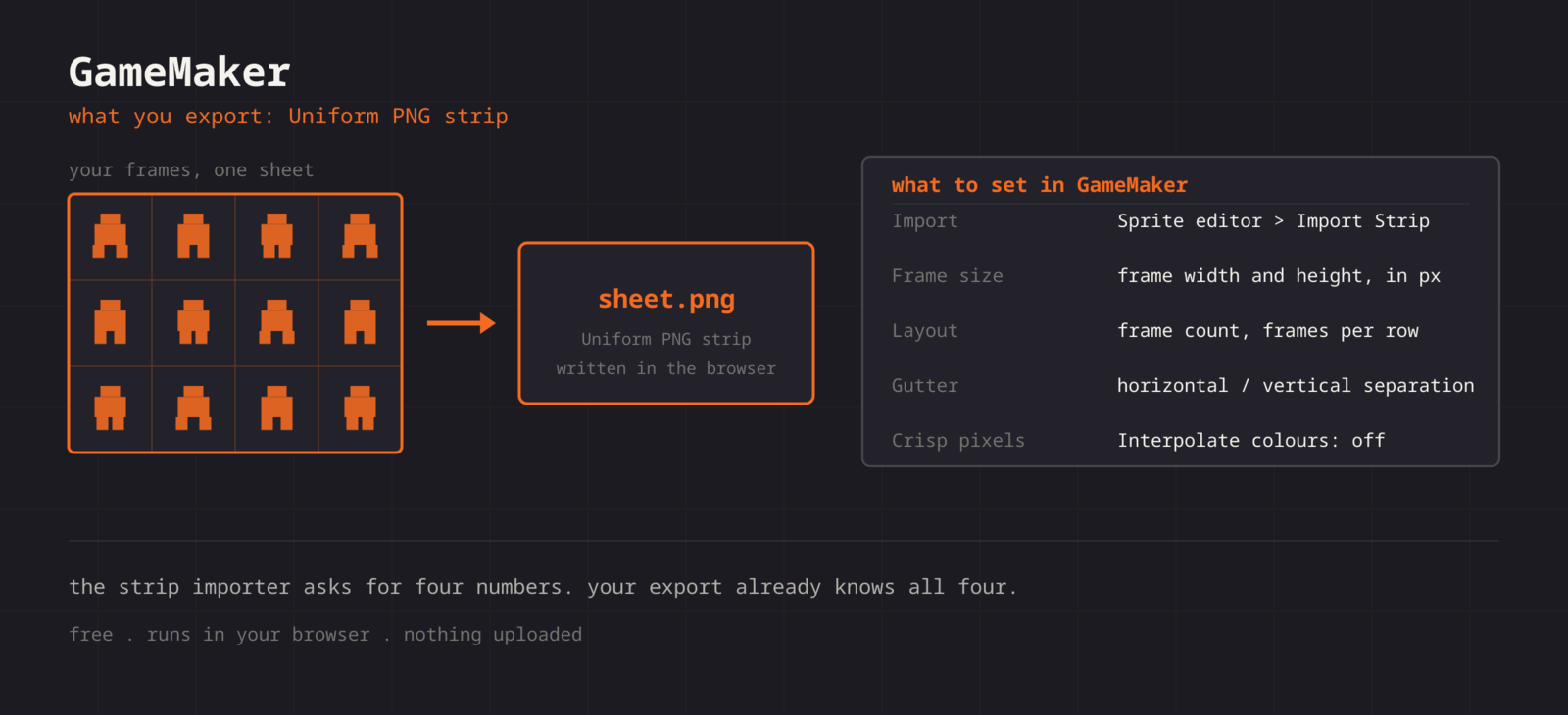
What you export
**Format menu**
**PNG**
Uniform PNG strip or grid
**GameMaker does not read third-party atlas files, so the grid carries the layout. Import the PNG into a sprite, open the Image Editor, and run Image > Convert to Frames with the cell size, frame count, and frames per row from this editor. Cells touch, so the offset and separation fields stay at 0. GameMaker repacks every sprite onto its own texture pages when it compiles, so how tightly the sheet is packed makes no difference to the build.**
Step by step
## **Getting the sheet into GameMaker**
1. **1**### **Export the PNG**
Note the cell size, the Columns value, and the frame count, then click PNG in the Export panel.
2. **2**### **Create the sprite**
In the Asset Browser, create a Sprite, click Import, and pick the PNG. It arrives as one large frame.
3. **3**### **Convert to Frames**
Click Edit Image to open the Image Editor, then choose Image > Convert to Frames. Enter Frame Width, Frame Height, Number of Frames, and Frames Per Row, leave offsets and separation at 0, and convert.
4. **4**### **Set origin and speed**
Pick an origin (Bottom Centre for a character on the ground) and set the sprite Speed in frames per second.
5. **5**### **Turn off interpolation**
In Game Options, open your target platform, go to Graphics, and untick Interpolate colours between pixels.
GML
```
// Create event
image_speed = 1; // sprite Speed value drives the FPS
image_index = 0;
// Swap animations by swapping sprite
if (moving) {
sprite_index = spr_hero_walk;
} else {
sprite_index = spr_hero_idle;
}
```
Cheat sheet
| **Setting** | **GameMaker value** |
| --- | --- |
| **Import** | Image Editor > Image > Convert to Frames |
| **Frame size** | Frame Width and Frame Height = cell size |
| **Layout** | Number of Frames and Frames Per Row |
| **Offsets and separation** | 0, the cells touch |
| **Crisp pixels** | Interpolate colours between pixels: off |
Built for the workflow
### **The \_strip shortcut**
Set Columns to the frame count to get a single row, then name the file spr\_hero\_strip8.png. GameMaker splits a file ending in \_stripN into N frames on import, no dialog needed.
### **Numbers you can read off**
Cell size, columns, and frame count are all shown in the editor, so Convert to Frames is typing rather than measuring.
### **Duplicate detection**
GameMaker plays every frame for the same time, so GIF-style held poses become repeated frames. The editor flags them so you can drop them and slow the Speed instead.
Troubleshooting
## **When the sheet fights GameMaker**
### **Only one frame appears after converting**
- **Cause**
- Number of Frames or Frames Per Row does not match the grid, so GameMaker read fewer cells than the image holds.
- **Fix**
- **Enter the frame count and the Columns value from the editor. Both are shown there, so they are numbers you already have.**
### **The animation speed ignores the value you typed**
- **Cause**
- Sprite Speed can be in frames per second or frames per game frame, and the same number means very different things in each.
- **Fix**
- **Set the unit to frames per second, enter the rate you previewed, and leave image_speed at 1 in code. Use image_speed for relative changes, such as 0.5 for slow motion.**
### **The sprite rotates or scales from a corner**
- **Cause**
- A new sprite gets a Top Left origin, which suits tiles and few characters.
- **Fix**
- **Set the origin to Middle Centre for something that rotates, or Bottom Centre for something standing on the ground. Do it once in the sprite editor rather than compensating in draw code.**
### **Collisions trigger before the sprite touches anything**
- **Cause**
- The collision mask Mode is Full Image, so the mask covers the transparent space around smaller art in each cell.
- **Fix**
- **Set the mask Mode to Automatic, which fits the opaque pixels, or choose Manual and draw the box. Precise Per Frame follows each frame exactly at a higher cost.**
### **A large sheet shows edge artefacts or loads slowly in the build**
- **Cause**
- Texture pages default to 2048x2048, and a sprite larger than the page is scaled down to fit or forced onto its own page.
- **Fix**
- **Raise Texture Page Size in the platform Graphics options, or split the sheet by animation and assign texture groups so a level loads only the pages it needs.**
Versions and edge cases
## **Versions and edge cases**
- **GameMaker Studio 2 and current GameMaker**
- Convert to Frames sits under the Image menu of the Image Editor and takes frame size, frame count, frames per row, offsets, and separation. A sheet from this editor needs only the first three.
- **Texture groups**
- Assign each sheet to a texture group that matches how the game loads. A boss in its own group can be prefetched and freed, which matters far more than how tightly the sheet is packed.
- **Tile sets**
- A Tile Set asset takes a sprite plus Tile Width and Tile Height. Export the tiles with Padding at 0 and leave the tile set offsets and separation at 0 to match.
GameMaker FAQ
###
###
###
**More detail in the **[**related guide**](https://spritesheetgenerator.online/guides/import-sprite-sheets-game-engines)**, or compare **[**every export format**](https://spritesheetgenerator.online/features/export-formats)**. **
Other engines
[**Unity**](https://spritesheetgenerator.online/engines/unity "Export a PNG grid with a .meta file that imports it already sliced.") [** Godot**](https://spritesheetgenerator.online/engines/godot "Export a SpriteFrames .tres and assign it to an AnimatedSprite2D.") [** Phaser**](https://spritesheetgenerator.online/engines/phaser "Export a TexturePacker-format JSON atlas and load it with this.load.atlas.") [** PixiJS**](https://spritesheetgenerator.online/engines/pixijs "The same JSON atlas, parsed by Assets.load into a Spritesheet.") [** Construct 3**](https://spritesheetgenerator.online/engines/construct "Export a uniform PNG and import it with Import frames > From sprite strip.") [** Defold**](https://spritesheetgenerator.online/engines/defold "Export a PNG with a Tile Source whose size and animation are already set.") [** Tiled**](https://spritesheetgenerator.online/engines/tiled "Export a .tsj tileset with columns, tile size, and count filled in.") [** FNF & Sparrow**](https://spritesheetgenerator.online/engines/fnf "Sparrow XML atlas for FNF mods, Starling, and HaxeFlixel.")
## **Export for GameMaker**
**Load your frames, check the loop in the Preview tab, then export. For GameMaker that means: Uniform PNG strip or grid.**
[Open the editor](https://spritesheetgenerator.online/editor) [**All engines**](https://spritesheetgenerator.online/engines)
```json
{"@context":"https://schema.org","@graph":[{"@id":"https://spritesheetgenerator.online/#website","@type":"WebSite","description":"Free online tool to create spritesheets for game development. Upload sprites, arrange them, and export as a spritesheet with animation preview.","name":"Spritesheet Generator","url":"https://spritesheetgenerator.online/","publisher":{"@id":"https://spritesheetgenerator.online/#identity"}},{"@id":"https://spritesheetgenerator.online/engines/gamemaker#webpage","@type":"WebPage","description":"Export a uniform PNG sprite sheet for GameMaker and split it with Image > Convert to Frames or the _strip file name trick. Origin, speed, and mask settings.","name":"GameMaker Sprite Sheets: Export and Convert to Frames","url":"https://spritesheetgenerator.online/engines/gamemaker","breadcrumb":{"@id":"https://spritesheetgenerator.online/engines/gamemaker#breadcrumb"},"isPartOf":{"@id":"https://spritesheetgenerator.online/#website"},"potentialAction":[{"@type":"ReadAction","target":["https://spritesheetgenerator.online/engines/gamemaker"]}],"primaryImageOfPage":{"@id":"https://spritesheetgenerator.online/#logo"}},{"@id":"https://spritesheetgenerator.online/#identity","@type":"Organization","description":"A free, browser based sprite sheet generator for 2D game developers and pixel artists.","name":"Spritesheet Generator","url":"https://spritesheetgenerator.online","logo":{"@id":"https://spritesheetgenerator.online/#logo"},"sameAs":["https://discord.gg/2vvfqwn5k7"]},{"@id":"https://spritesheetgenerator.online/engines/gamemaker#breadcrumb","@type":"BreadcrumbList","itemListElement":[{"@type":"ListItem","name":"Home","item":"https://spritesheetgenerator.online","position":1},{"@type":"ListItem","name":"Engines","item":"https://spritesheetgenerator.online/engines","position":2},{"@type":"ListItem","name":"GameMaker","item":"https://spritesheetgenerator.online/engines/gamemaker","position":3}]},{"@id":"https://spritesheetgenerator.online/engines/gamemaker#/schema/question/1","@type":"Question","inLanguage":"en","name":"Should I use editor Padding for GameMaker?","acceptedAnswer":{"@type":"Answer","text":"Usually not. Texture groups already put a border around each sprite on the texture page. Editor Padding adds transparent pixels inside every cell, which become part of each frame and shift where the origin sits. Leave it at 0 unless you want that margin."}},{"@id":"https://spritesheetgenerator.online/engines/gamemaker#/schema/question/2","@type":"Question","inLanguage":"en","name":"Why are my frames offset after Convert to Frames?","acceptedAnswer":{"@type":"Answer","text":"Frame Width was typed as the size of the art rather than the cell, or an offset or separation field was left above 0. Use the cell size from the editor and zeros everywhere else."}},{"@id":"https://spritesheetgenerator.online/engines/gamemaker#/schema/question/3","@type":"Question","inLanguage":"en","name":"GameMaker imports GIFs. Why go through a sheet?","acceptedAnswer":{"@type":"Answer","text":"A GIF import keeps every frame, including the duplicates a GIF uses to hold a pose, and a GameMaker sprite has one speed for all frames. Load the GIF here, drop the repeats, and export a sheet whose frame count matches the motion."}},{"@id":"https://spritesheetgenerator.online/#logo","@type":"ImageObject","caption":"Spritesheet Generator","contentUrl":"https://spritesheetgenerator.online/web-app-manifest-512x512.png","inLanguage":"en","url":"https://spritesheetgenerator.online/web-app-manifest-512x512.png"}]}
```
## Sitemap
See the full [sitemap](https://spritesheetgenerator.online/sitemap.md) for all pages.