---
title: "Phaser 3 Sprite Sheets with JSON Atlas Export"
description: "Export a TexturePacker-format JSON atlas for Phaser 3, load it with this.load.atlas, and build animations from frame_000 names using generateFrameNames."
canonical_url: "https://spritesheetgenerator.online/engines/phaser"
meta:
author: "Dennis Postma"
"og:description": "Export a TexturePacker-format JSON atlas for Phaser 3, load it with this.load.atlas, and build animations from frame_000 names using generateFrameNames."
"og:image": "https://spritesheetgenerator.online/og-image.png"
"og:image:alt": "Spritesheet Generator editor showing sprites arranged on a sheet grid"
"og:title": "Phaser 3 Sprite Sheets with JSON Atlas Export"
"twitter:image": "https://spritesheetgenerator.online/og-image.png"
"twitter:image:alt": "Spritesheet Generator editor showing sprites arranged on a sheet grid"
---
> Index of every page on this site: [llms.txt](https://spritesheetgenerator.online/llms.txt)
PhaserMetadata export
# **Sprite Sheet Generator for Phaser 3**
**Export a JSON atlas for this.load.atlas, or a plain PNG for this.load.spritesheet. Frames are named frame\_000 upward, which is what generateFrameNames expects with zeroPad: 3.**
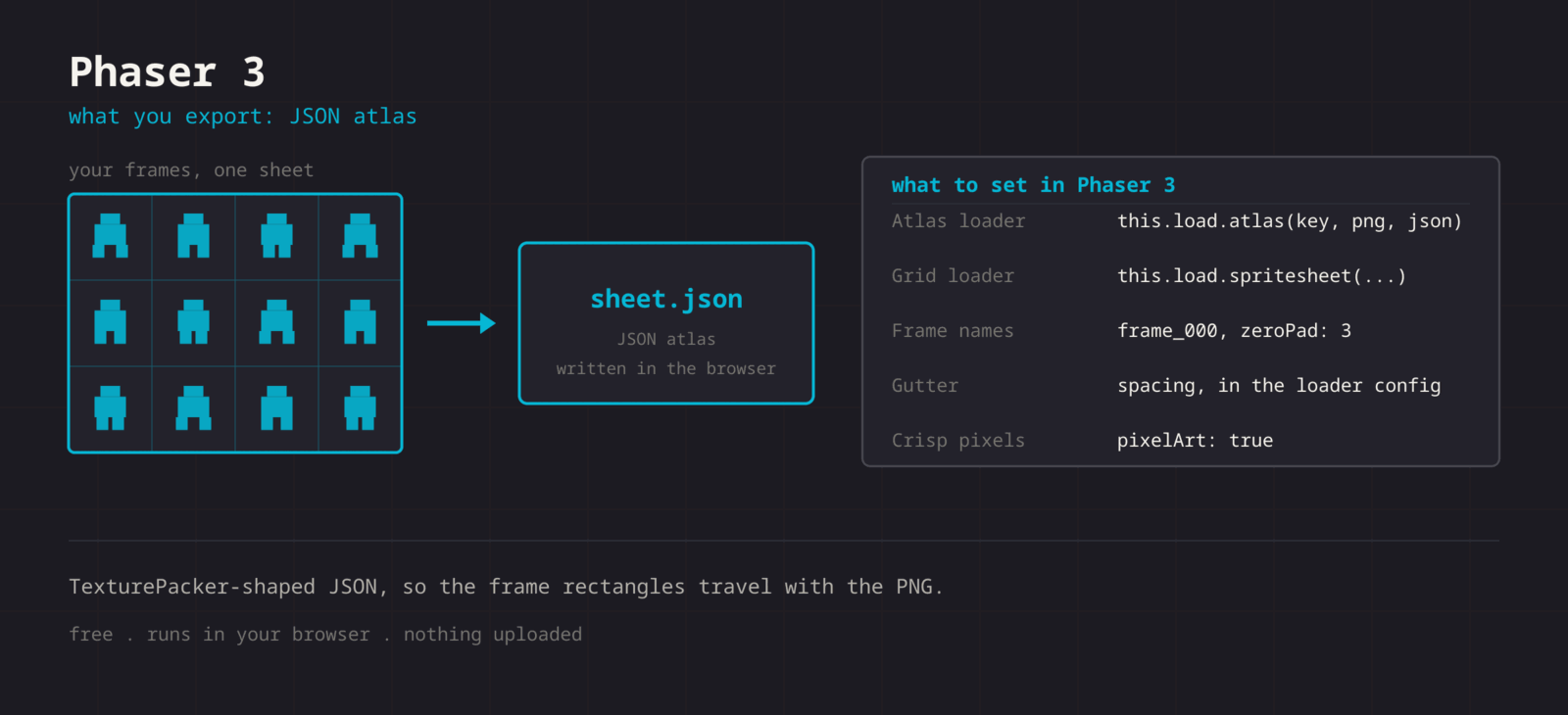
What you export
**Format menu**
**Phaser / PixiJS**
JSON atlas (TexturePacker format)
**Format > Phaser / PixiJS downloads spritesheet.png and spritesheet.json. The JSON uses the TexturePacker hash layout: one entry per frame, keyed frame\_000, frame\_001 and so on, each with its frame rect. Phaser reads it through this.load.atlas, which takes the PNG and JSON URLs as separate arguments, so you can rename both files. The cells also form a plain grid with no spacing, so the same PNG works with this.load.spritesheet if you would rather address frames by number.**
Step by step
## **Getting the sheet into Phaser**
1. **1**### **Export the atlas**
Click Format in the Export panel and choose Phaser / PixiJS. The ZIP holds spritesheet.png and spritesheet.json.
2. **2**### **Load it**
In preload(), call this.load.atlas with a texture key, the PNG path, and the JSON path.
3. **3**### **Build the animation**
Use generateFrameNames with prefix frame\_, zeroPad 3, start 0, and end at the frame count minus one. If you loaded the grid instead, use generateFrameNumbers.
4. **4**### **Turn on pixelArt**
Set pixelArt: true in the game config so textures use nearest-neighbour sampling.
JavaScript
```
// Atlas path (recommended)
function preload() {
this.load.atlas('hero', 'hero.png', 'hero.json');
}
function create() {
this.anims.create({
key: 'walk',
frames: this.anims.generateFrameNames('hero', {
prefix: 'frame_',
start: 0,
end: 7,
zeroPad: 3,
}),
frameRate: 12,
repeat: -1,
});
this.add.sprite(100, 100, 'hero').play('walk');
}
// Grid path, if you exported the PNG only
this.load.spritesheet('hero', 'hero.png', {
frameWidth: 32, // the cell size shown in the editor
frameHeight: 32, // cells touch, so no spacing or margin
});
```
Cheat sheet
| **Setting** | **Phaser value** |
| --- | --- |
| **Atlas loader** | this.load.atlas(key, png, json) |
| **Grid loader** | this.load.spritesheet(key, png, config) |
| **Frame names** | frame\_000, zeroPad: 3 |
| **spacing / margin** | 0, the cells touch |
| **Crisp pixels** | pixelArt: true in the game config |
Built for the workflow
### **TexturePacker hash format**
The JSON shape Phaser has loaded since 3.0, so atlas tutorials and plugins written for TexturePacker output apply as they are.
### **Grid path too**
Prefer this.load.spritesheet? Export only the PNG and pass the cell size as frameWidth and frameHeight.
### **Reads atlases back**
The Splitter accepts a TexturePacker JSON with its PNG, so an atlas from another tool can be cut into frames, edited, and exported again.
Troubleshooting
## **When the sheet fights Phaser**
### **The console reports a 404 while loading the atlas**
- **Cause**
- The PNG or JSON path is relative to the wrong base. Phaser resolves both against the loader baseURL and path, not against the page that calls preload.
- **Fix**
- **Check the network tab for the URL Phaser requested, then fix the path or set this.load.setPath to the asset folder.**
### **The animation plays once and freezes on the last frame**
- **Cause**
- repeat defaults to 0, which plays the sequence one time.
- **Fix**
- **Set repeat to -1 for an endless loop. For a one-shot that should return to idle, keep repeat at 0 and play the idle animation from the animationcomplete event.**
### **Frames from load.spritesheet are cropped or include part of the neighbour**
- **Cause**
- frameWidth or frameHeight is the size of the art rather than the cell. With Padding set in the editor, the cell is larger than the art.
- **Fix**
- **Use the cell size from the Grid Layout panel and leave spacing and margin out. Or switch to the atlas, where each rect is written down for you.**
### **Sprites look soft even with pixelArt enabled**
- **Cause**
- pixelArt sets nearest sampling, but sprites at fractional coordinates, which a moving camera produces, still smear.
- **Fix**
- **Add roundPixels: true to the game config. For a camera that follows a body, setting roundPixels on the camera keeps the scene on whole pixels.**
### **Switching animations jumps to a jarring pose**
- **Cause**
- play interrupts the current animation immediately, so a run that cuts to idle mid-stride snaps.
- **Fix**
- **Use playAfterRepeat to let the current cycle finish first, or playAfterDelay for a timed switch.**
Versions and edge cases
## **Versions and edge cases**
- **Phaser 3**
- load.atlas has read this JSON shape since 3.0. generateFrameNames, play, and the animationcomplete event work the same across the 3.x line; playAfterRepeat and the Aseprite loader arrived in 3.50.
- **Phaser 4**
- The loader calls and the animation manager carry over, so code that loads and animates this atlas needs no change. The rewrite is mostly in the renderer.
- **Phaser 2 and CE**
- The older versions load the same file with load.atlasJSONHash. The animation API is different, so follow a Phaser 2 tutorial for the play calls.
- **Vite and webpack**
- Put the PNG and JSON in the public directory instead of importing them, so the runtime paths stay predictable and the JSON is not inlined into the bundle.
- **Scale manager**
- The scale manager can put the canvas on a fractional zoom, which softens sprites whatever the renderer settings say. Use an integer zoom, or Scale.FIT with a game size that divides the window cleanly.
Phaser FAQ
###
###
###
**More detail in the **[**related guide**](https://spritesheetgenerator.online/guides/import-sprite-sheets-game-engines)**, or compare **[**every export format**](https://spritesheetgenerator.online/features/export-formats)**. **
Other engines
[**Unity**](https://spritesheetgenerator.online/engines/unity "Export a PNG grid with a .meta file that imports it already sliced.") [** Godot**](https://spritesheetgenerator.online/engines/godot "Export a SpriteFrames .tres and assign it to an AnimatedSprite2D.") [** PixiJS**](https://spritesheetgenerator.online/engines/pixijs "The same JSON atlas, parsed by Assets.load into a Spritesheet.") [** GameMaker**](https://spritesheetgenerator.online/engines/gamemaker "Export a uniform PNG and split it with Convert to Frames.") [** Construct 3**](https://spritesheetgenerator.online/engines/construct "Export a uniform PNG and import it with Import frames > From sprite strip.") [** Defold**](https://spritesheetgenerator.online/engines/defold "Export a PNG with a Tile Source whose size and animation are already set.") [** Tiled**](https://spritesheetgenerator.online/engines/tiled "Export a .tsj tileset with columns, tile size, and count filled in.") [** FNF & Sparrow**](https://spritesheetgenerator.online/engines/fnf "Sparrow XML atlas for FNF mods, Starling, and HaxeFlixel.")
## **Export for Phaser**
**Load your frames, check the loop in the Preview tab, then export. For Phaser that means: JSON atlas (TexturePacker format).**
[Open the editor](https://spritesheetgenerator.online/editor) [**All engines**](https://spritesheetgenerator.online/engines)
```json
{"@context":"https://schema.org","@graph":[{"@id":"https://spritesheetgenerator.online/#website","@type":"WebSite","description":"Free online tool to create spritesheets for game development. Upload sprites, arrange them, and export as a spritesheet with animation preview.","name":"Spritesheet Generator","url":"https://spritesheetgenerator.online/","publisher":{"@id":"https://spritesheetgenerator.online/#identity"}},{"@id":"https://spritesheetgenerator.online/engines/phaser#webpage","@type":"WebPage","description":"Export a TexturePacker-format JSON atlas for Phaser 3, load it with this.load.atlas, and build animations from frame_000 names using generateFrameNames.","name":"Phaser 3 Sprite Sheets with JSON Atlas Export","url":"https://spritesheetgenerator.online/engines/phaser","breadcrumb":{"@id":"https://spritesheetgenerator.online/engines/phaser#breadcrumb"},"isPartOf":{"@id":"https://spritesheetgenerator.online/#website"},"potentialAction":[{"@type":"ReadAction","target":["https://spritesheetgenerator.online/engines/phaser"]}],"primaryImageOfPage":{"@id":"https://spritesheetgenerator.online/#logo"}},{"@id":"https://spritesheetgenerator.online/#identity","@type":"Organization","description":"A free, browser based sprite sheet generator for 2D game developers and pixel artists.","name":"Spritesheet Generator","url":"https://spritesheetgenerator.online","logo":{"@id":"https://spritesheetgenerator.online/#logo"},"sameAs":["https://discord.gg/2vvfqwn5k7"]},{"@id":"https://spritesheetgenerator.online/engines/phaser#breadcrumb","@type":"BreadcrumbList","itemListElement":[{"@type":"ListItem","name":"Home","item":"https://spritesheetgenerator.online","position":1},{"@type":"ListItem","name":"Engines","item":"https://spritesheetgenerator.online/engines","position":2},{"@type":"ListItem","name":"Phaser","item":"https://spritesheetgenerator.online/engines/phaser","position":3}]},{"@id":"https://spritesheetgenerator.online/engines/phaser#/schema/question/1","@type":"Question","inLanguage":"en","name":"Atlas or spritesheet loader?","acceptedAnswer":{"@type":"Answer","text":"Either works with this export, because the atlas describes the same uniform grid. The atlas gives you named frames and keeps working if you later repack the art in a tool that moves frames around. load.spritesheet needs only the PNG and the cell size, which is handy for a quick prototype."}},{"@id":"https://spritesheetgenerator.online/engines/phaser#/schema/question/2","@type":"Question","inLanguage":"en","name":"My animation frames are out of order.","acceptedAnswer":{"@type":"Answer","text":"generateFrameNames builds names from prefix, number, and zeroPad, so those have to match the export exactly: prefix \"frame_\" and zeroPad 3. With zeroPad left out it asks for frame_0 and frame_1, which do not exist."}},{"@id":"https://spritesheetgenerator.online/engines/phaser#/schema/question/3","@type":"Question","inLanguage":"en","name":"Can I use the Aseprite export with Phaser instead?","acceptedAnswer":{"@type":"Answer","text":"Yes. Phaser 3.50 and later have this.load.aseprite and this.anims.createFromAseprite. The Aseprite export here writes one tag named animation with 100 ms per frame, so you get an animation called animation at 10 FPS. The Phaser / PixiJS export leaves the key and rate to you."}},{"@id":"https://spritesheetgenerator.online/#logo","@type":"ImageObject","caption":"Spritesheet Generator","contentUrl":"https://spritesheetgenerator.online/web-app-manifest-512x512.png","inLanguage":"en","url":"https://spritesheetgenerator.online/web-app-manifest-512x512.png"}]}
```
## Sitemap
See the full [sitemap](https://spritesheetgenerator.online/sitemap.md) for all pages.