---
title: "PixiJS Spritesheet JSON Export for Assets.load"
description: "Export a TexturePacker-format JSON atlas that PixiJS v8 loads with Assets.load, then build an AnimatedSprite from sheet.textures. With v7 and v6 notes."
canonical_url: "https://spritesheetgenerator.online/engines/pixijs"
meta:
author: "Dennis Postma"
"og:description": "Export a TexturePacker-format JSON atlas that PixiJS v8 loads with Assets.load, then build an AnimatedSprite from sheet.textures. With v7 and v6 notes."
"og:image": "https://spritesheetgenerator.online/og-image.png"
"og:image:alt": "Spritesheet Generator editor showing sprites arranged on a sheet grid"
"og:title": "PixiJS Spritesheet JSON Export for Assets.load"
"twitter:image": "https://spritesheetgenerator.online/og-image.png"
"twitter:image:alt": "Spritesheet Generator editor showing sprites arranged on a sheet grid"
---
> Index of every page on this site: [llms.txt](https://spritesheetgenerator.online/llms.txt)
PixiJSMetadata export
# **Sprite Sheet Generator for PixiJS**
**PixiJS parses the TexturePacker-format JSON from the Phaser / PixiJS export on its own. Assets.load returns a Spritesheet with every texture cut and named.**
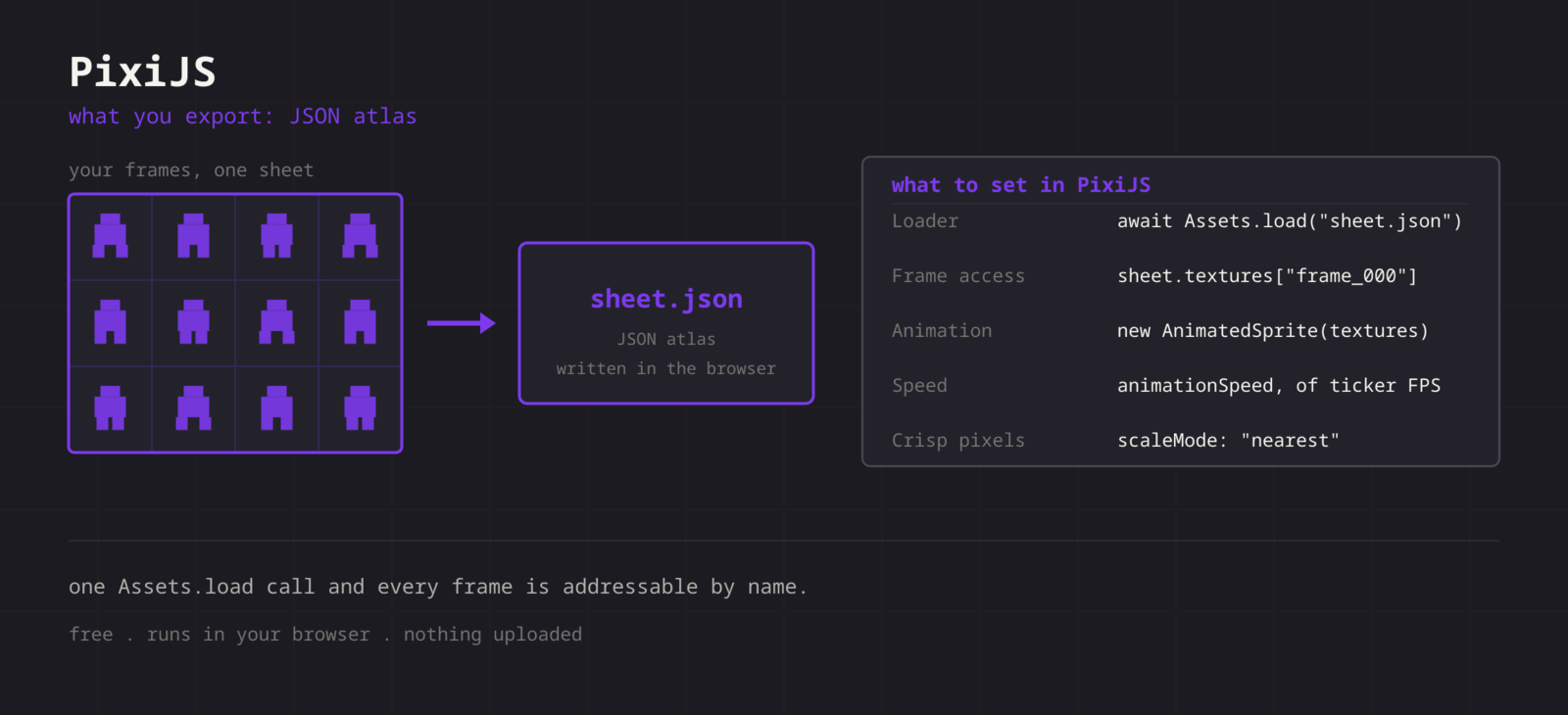
What you export
**Format menu**
**Phaser / PixiJS**
JSON atlas (TexturePacker format)
**PixiJS reads the same JSON as Phaser but loads it differently. You pass Assets.load the JSON only, and Pixi fetches the image named in meta.image, relative to the JSON file. The export writes spritesheet.png there, so if you rename the PNG, change that field too. What comes back is a Spritesheet whose textures map is keyed frame\_000 upward, in export order.**
Step by step
## **Getting the sheet into PixiJS**
1. **1**### **Export the atlas**
Click Format, choose Phaser / PixiJS, and unzip spritesheet.png and spritesheet.json into the same folder.
2. **2**### **Load it**
Await Assets.load on the JSON path. Pixi fetches the PNG named inside it and returns a Spritesheet.
3. **3**### **Build the AnimatedSprite**
Pass the textures to new AnimatedSprite. Keys run frame\_000 upward, so Object.values(sheet.textures) is already in playback order.
4. **4**### **Keep pixels crisp**
In v8, set TextureSource.defaultOptions.scaleMode to "nearest" before the first load.
JavaScript
```
import { Assets, AnimatedSprite, TextureSource } from 'pixi.js';
TextureSource.defaultOptions.scaleMode = 'nearest';
const sheet = await Assets.load('spritesheet.json');
const hero = new AnimatedSprite(Object.values(sheet.textures));
hero.animationSpeed = 0.2; // 12 fps: animationSpeed is frames per 1/60 s
hero.play();
app.stage.addChild(hero);
```
Cheat sheet
| **Setting** | **PixiJS value** |
| --- | --- |
| **Loader** | await Assets.load("spritesheet.json") |
| **Frame access** | sheet.textures\["frame\_000"] |
| **Animation** | new AnimatedSprite(textures) |
| **Speed** | animationSpeed = fps / 60 |
| **Crisp pixels** | scaleMode: "nearest" |
Built for the workflow
### **Parsed on load**
Pixi recognises the TexturePacker shape and builds the Spritesheet itself. No Rectangle maths on your side.
### **Stable frame order**
Names are zero-padded (frame\_000, frame\_001), so insertion order and sort order agree.
### **Single frames by name**
Need one pose for a static Sprite? sheet.textures.frame\_004 is a ready Texture, no sub-rectangle to work out.
Troubleshooting
## **When the sheet fights PixiJS**
### **Assets.load returns a Texture rather than a Spritesheet**
- **Cause**
- The PNG path was passed instead of the JSON path. Pixi decides what to build from the file it is given.
- **Fix**
- **Load the .json. Pixi parses it, fetches the image itself, and hands back a Spritesheet.**
### **Assets.load fails with a 404 for the image after renaming files**
- **Cause**
- The JSON still names spritesheet.png in meta.image, and Pixi resolves that relative to the JSON.
- **Fix**
- **Edit meta.image to the new file name, or keep the exported names.**
### **The AnimatedSprite runs at the wrong speed**
- **Cause**
- animationSpeed is a multiplier on the ticker delta, which is normalised to 60 frames per second. A value of 12 advances twelve frames per sixtieth of a second.
- **Fix**
- **Divide your target rate by 60: 12 FPS is 0.2, 8 FPS is about 0.133. The result holds on 120 Hz screens too, because the delta is time based.**
### **Textures are still smoothed after setting nearest**
- **Cause**
- The scale mode was changed after the textures were created, so they kept the old default.
- **Fix**
- **Set TextureSource.defaultOptions.scaleMode before the first Assets.load. For a texture that already exists, set scaleMode on its source.**
### **Frames come out in an unexpected order**
- **Cause**
- Object.values follows key insertion order, which matches playback only while the names keep their fixed-width padding.
- **Fix**
- **Keep the frame_000 names. If you rename frames, sort the keys with a numeric comparator before building the AnimatedSprite.**
### **Code from a v7 tutorial throws on v8**
- **Cause**
- v8 changed setup: Application needs await app.init(), and scale modes moved from SCALE_MODES constants to strings on TextureSource. The atlas format did not change.
- **Fix**
- **Update the setup calls and keep the JSON and PNG exactly as exported.**
### **The first play stutters on a large sheet**
- **Cause**
- The texture is uploaded to the GPU the first time it is drawn, which is the frame the animation starts.
- **Fix**
- **Draw the sprite once behind a loading screen, or upload the texture early with the renderer prepare system.**
Versions and edge cases
## **Versions and edge cases**
- **PixiJS v8**
- Assets.load parses the TexturePacker shape and returns a Spritesheet. TextureSource.defaultOptions.scaleMode is where nearest sampling is set globally.
- **PixiJS v7**
- Assets.load already existed and parses the file the same way. Nearest sampling is set with BaseTexture.defaultOptions.scaleMode = SCALE_MODES.NEAREST.
- **PixiJS v6**
- Loading went through the Loader: add the JSON, and read the Spritesheet from resources[name].spritesheet in the complete callback. Textures are keyed the same way.
PixiJS FAQ
###
###
###
**More detail in the **[**related guide**](https://spritesheetgenerator.online/guides/import-sprite-sheets-game-engines)**, or compare **[**every export format**](https://spritesheetgenerator.online/features/export-formats)**. **
Other engines
[**Unity**](https://spritesheetgenerator.online/engines/unity "Export a PNG grid with a .meta file that imports it already sliced.") [** Godot**](https://spritesheetgenerator.online/engines/godot "Export a SpriteFrames .tres and assign it to an AnimatedSprite2D.") [** Phaser**](https://spritesheetgenerator.online/engines/phaser "Export a TexturePacker-format JSON atlas and load it with this.load.atlas.") [** GameMaker**](https://spritesheetgenerator.online/engines/gamemaker "Export a uniform PNG and split it with Convert to Frames.") [** Construct 3**](https://spritesheetgenerator.online/engines/construct "Export a uniform PNG and import it with Import frames > From sprite strip.") [** Defold**](https://spritesheetgenerator.online/engines/defold "Export a PNG with a Tile Source whose size and animation are already set.") [** Tiled**](https://spritesheetgenerator.online/engines/tiled "Export a .tsj tileset with columns, tile size, and count filled in.") [** FNF & Sparrow**](https://spritesheetgenerator.online/engines/fnf "Sparrow XML atlas for FNF mods, Starling, and HaxeFlixel.")
## **Export for PixiJS**
**Load your frames, check the loop in the Preview tab, then export. For PixiJS that means: JSON atlas (TexturePacker format).**
[Open the editor](https://spritesheetgenerator.online/editor) [**All engines**](https://spritesheetgenerator.online/engines)
```json
{"@context":"https://schema.org","@graph":[{"@id":"https://spritesheetgenerator.online/#website","@type":"WebSite","description":"Free online tool to create spritesheets for game development. Upload sprites, arrange them, and export as a spritesheet with animation preview.","name":"Spritesheet Generator","url":"https://spritesheetgenerator.online/","publisher":{"@id":"https://spritesheetgenerator.online/#identity"}},{"@id":"https://spritesheetgenerator.online/engines/pixijs#webpage","@type":"WebPage","description":"Export a TexturePacker-format JSON atlas that PixiJS v8 loads with Assets.load, then build an AnimatedSprite from sheet.textures. With v7 and v6 notes.","name":"PixiJS Spritesheet JSON Export for Assets.load","url":"https://spritesheetgenerator.online/engines/pixijs","breadcrumb":{"@id":"https://spritesheetgenerator.online/engines/pixijs#breadcrumb"},"isPartOf":{"@id":"https://spritesheetgenerator.online/#website"},"potentialAction":[{"@type":"ReadAction","target":["https://spritesheetgenerator.online/engines/pixijs"]}],"primaryImageOfPage":{"@id":"https://spritesheetgenerator.online/#logo"}},{"@id":"https://spritesheetgenerator.online/#identity","@type":"Organization","description":"A free, browser based sprite sheet generator for 2D game developers and pixel artists.","name":"Spritesheet Generator","url":"https://spritesheetgenerator.online","logo":{"@id":"https://spritesheetgenerator.online/#logo"},"sameAs":["https://discord.gg/2vvfqwn5k7"]},{"@id":"https://spritesheetgenerator.online/engines/pixijs#breadcrumb","@type":"BreadcrumbList","itemListElement":[{"@type":"ListItem","name":"Home","item":"https://spritesheetgenerator.online","position":1},{"@type":"ListItem","name":"Engines","item":"https://spritesheetgenerator.online/engines","position":2},{"@type":"ListItem","name":"PixiJS","item":"https://spritesheetgenerator.online/engines/pixijs","position":3}]},{"@id":"https://spritesheetgenerator.online/engines/pixijs#/schema/question/1","@type":"Question","inLanguage":"en","name":"sheet.animations is empty. Why?","acceptedAnswer":{"@type":"Answer","text":"Pixi fills sheet.animations from an animations block in the JSON, and this export does not write one. Object.values(sheet.textures) gives you the same frames in export order."}},{"@id":"https://spritesheetgenerator.online/engines/pixijs#/schema/question/2","@type":"Question","inLanguage":"en","name":"Can I add named animations to the JSON?","acceptedAnswer":{"@type":"Answer","text":"Yes. Add a top-level block such as \"animations\": { \"walk\": [\"frame_000\", \"frame_001\", \"frame_002\"] } and Pixi fills sheet.animations.walk with those textures. It is plain JSON, so any editor will do."}},{"@id":"https://spritesheetgenerator.online/engines/pixijs#/schema/question/3","@type":"Question","inLanguage":"en","name":"Can one atlas serve both Phaser and PixiJS?","acceptedAnswer":{"@type":"Answer","text":"Yes, that is why the format entry is labelled for both. The one difference is that Pixi finds the PNG through meta.image, while Phaser takes the PNG path as a loader argument."}},{"@id":"https://spritesheetgenerator.online/#logo","@type":"ImageObject","caption":"Spritesheet Generator","contentUrl":"https://spritesheetgenerator.online/web-app-manifest-512x512.png","inLanguage":"en","url":"https://spritesheetgenerator.online/web-app-manifest-512x512.png"}]}
```
## Sitemap
See the full [sitemap](https://spritesheetgenerator.online/sitemap.md) for all pages.