---
title: "Tiled Tilesets: Pack Tiles and Export a .tsj"
description: "Pack tiles into one PNG and export a Tiled JSON tileset (.tsj) with tile size, columns, and tile count set. Notes on external tilesets and Phaser maps."
canonical_url: "https://spritesheetgenerator.online/engines/tiled"
meta:
author: "Dennis Postma"
"og:description": "Pack tiles into one PNG and export a Tiled JSON tileset (.tsj) with tile size, columns, and tile count set. Notes on external tilesets and Phaser maps."
"og:image": "https://spritesheetgenerator.online/og-image.png"
"og:image:alt": "Spritesheet Generator editor showing sprites arranged on a sheet grid"
"og:title": "Tiled Tilesets: Pack Tiles and Export a .tsj"
"twitter:image": "https://spritesheetgenerator.online/og-image.png"
"twitter:image:alt": "Spritesheet Generator editor showing sprites arranged on a sheet grid"
---
> Index of every page on this site: [llms.txt](https://spritesheetgenerator.online/llms.txt)
TiledMetadata export
# **Tileset Generator for Tiled**
**Pack your tiles into one image and export a JSON tileset. Tiled opens the .tsj with the tile size, column count, and tile count already set.**
What you export
**Format menu**
**Tiled**
JSON tileset (.tsj)
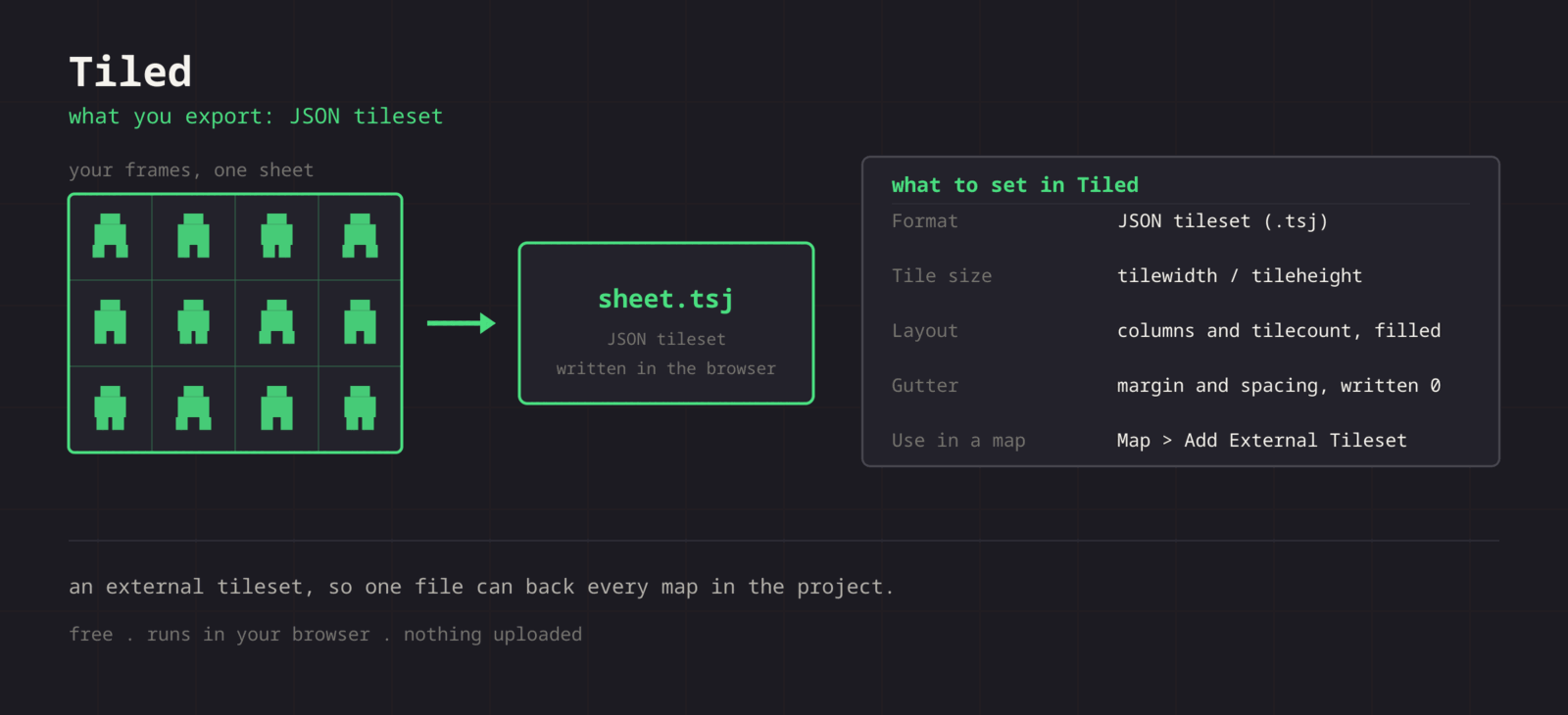
**Format > Tiled downloads spritesheet.png and spritesheet.tsj. The tileset records tile width and height, columns, tile count, image size, and image file name. Margin and spacing are written as 0, which matches the image, because cells in this editor always touch. Open the .tsj in Tiled, or add it to a map as an external tileset, and the grid is already right.**
Step by step
## **Getting the sheet into Tiled**
1. **1**### **Lay out the tiles**
Set Columns to the width you want in the Tilesets panel and leave Padding at 0. Padding would show up as a transparent border on every tile.
2. **2**### **Export the .tsj**
Click Format in the Export panel and choose Tiled. Keep spritesheet.png next to the .tsj, since the tileset finds the image by file name.
3. **3**### **Open it in Tiled**
Use File > Open on the .tsj, or from a map use Map > Add External Tileset.
4. **4**### **Paint**
The Tilesets panel shows every tile at the right size. Terrain sets, collision shapes, and tile properties go on top from here.
Cheat sheet
| **Setting** | **Tiled value** |
| --- | --- |
| **Use in a map** | Map > Add External Tileset |
| **Format** | JSON tileset (.tsj) |
| **Tile size** | tilewidth / tileheight = cell size |
| **Layout** | columns and tilecount, filled in |
| **margin / spacing** | Written as 0, matching the image |
Built for the workflow
### **No New Tileset wizard**
The .tsj already describes the grid it came from, so you never retype tile size or count.
### **Tile ids in sheet order**
Tiled numbers tiles left to right and top to bottom, so the order you arrange here is the id order in every map.
### **Split then rebuild**
Have an old tileset? Split it into tiles, rearrange or recolour them, and export a fresh sheet with a matching .tsj.
Troubleshooting
## **When the sheet fights Tiled**
### **Tiles are misaligned after replacing the PNG**
- **Cause**
- The .tsj stores imagewidth, imageheight, columns, and tilecount. A PNG with a different size or column count no longer matches those numbers.
- **Fix**
- **Re-export both files whenever the grid changes. If only the artwork changed and the dimensions are identical, replacing the PNG alone is safe and keeps your Tiled data.**
### **A map opens with the tileset missing**
- **Cause**
- A map references an external tileset by relative path, so moving the .tsj breaks the link.
- **Fix**
- **Keep maps, the .tsj, and the PNG in a stable folder layout and commit them together. Tiled offers to locate a missing tileset, and pointing it at the file once repairs the reference.**
### **Tile ids shift and an existing map fills with the wrong tiles**
- **Cause**
- Ids follow position. Inserting a tile in the middle renumbers everything after it.
- **Fix**
- **Add new tiles at the end and keep Columns the same. A new row at the bottom leaves every existing id alone.**
### **Collision shapes and terrain sets disappear after a re-export**
- **Cause**
- The export writes a fresh .tsj, which replaces the file where Tiled saved what you authored.
- **Fix**
- **Once you start authoring in Tiled, treat the .tsj as yours. Export new ones under another name and copy across what you need, or replace only the PNG when the grid has not changed.**
### **The tileset ends with transparent tiles**
- **Cause**
- tilecount is the number of frames in the editor, so blank frames you inserted become real, empty tiles. Unused cells after the last frame are not counted.
- **Fix**
- **Remove blank frames before exporting. They are harmless when painting but still take up ids.**
Versions and edge cases
## **Versions and edge cases**
- **External versus embedded**
- An external tileset can be shared by many maps, so a fix reaches all of them. Embedding it in one map is simpler for a jam and painful once a second map needs the same tiles.
- **Phaser**
- this.load.tilemapTiledJSON does not resolve external tilesets. Embed the tileset in the map before exporting it (the Embed Tileset button in the Tilesets panel), then load the PNG under the tileset name.
- **Godot and Unity**
- Neither imports Tiled maps on its own. Community importers fill the gap; check whether yours expects external or embedded tilesets before you settle on one.
Tiled FAQ
###
###
###
###
**More detail in the **[**related guide**](https://spritesheetgenerator.online/guides/sprite-sheet-packing-padding)**, or compare **[**every export format**](https://spritesheetgenerator.online/features/export-formats)**. **
Other engines
[**Unity**](https://spritesheetgenerator.online/engines/unity "Export a PNG grid with a .meta file that imports it already sliced.") [** Godot**](https://spritesheetgenerator.online/engines/godot "Export a SpriteFrames .tres and assign it to an AnimatedSprite2D.") [** Phaser**](https://spritesheetgenerator.online/engines/phaser "Export a TexturePacker-format JSON atlas and load it with this.load.atlas.") [** PixiJS**](https://spritesheetgenerator.online/engines/pixijs "The same JSON atlas, parsed by Assets.load into a Spritesheet.") [** GameMaker**](https://spritesheetgenerator.online/engines/gamemaker "Export a uniform PNG and split it with Convert to Frames.") [** Construct 3**](https://spritesheetgenerator.online/engines/construct "Export a uniform PNG and import it with Import frames > From sprite strip.") [** Defold**](https://spritesheetgenerator.online/engines/defold "Export a PNG with a Tile Source whose size and animation are already set.") [** FNF & Sparrow**](https://spritesheetgenerator.online/engines/fnf "Sparrow XML atlas for FNF mods, Starling, and HaxeFlixel.")
## **Export for Tiled**
**Load your frames, check the loop in the Preview tab, then export. For Tiled that means: JSON tileset (.tsj).**
[Open the editor](https://spritesheetgenerator.online/editor) [**All engines**](https://spritesheetgenerator.online/engines)
```json
{"@context":"https://schema.org","@graph":[{"@id":"https://spritesheetgenerator.online/#website","@type":"WebSite","description":"Free online tool to create spritesheets for game development. Upload sprites, arrange them, and export as a spritesheet with animation preview.","name":"Spritesheet Generator","url":"https://spritesheetgenerator.online/","publisher":{"@id":"https://spritesheetgenerator.online/#identity"}},{"@id":"https://spritesheetgenerator.online/engines/tiled#webpage","@type":"WebPage","description":"Pack tiles into one PNG and export a Tiled JSON tileset (.tsj) with tile size, columns, and tile count set. Notes on external tilesets and Phaser maps.","name":"Tiled Tilesets: Pack Tiles and Export a .tsj","url":"https://spritesheetgenerator.online/engines/tiled","breadcrumb":{"@id":"https://spritesheetgenerator.online/engines/tiled#breadcrumb"},"isPartOf":{"@id":"https://spritesheetgenerator.online/#website"},"potentialAction":[{"@type":"ReadAction","target":["https://spritesheetgenerator.online/engines/tiled"]}],"primaryImageOfPage":{"@id":"https://spritesheetgenerator.online/#logo"}},{"@id":"https://spritesheetgenerator.online/#identity","@type":"Organization","description":"A free, browser based sprite sheet generator for 2D game developers and pixel artists.","name":"Spritesheet Generator","url":"https://spritesheetgenerator.online","logo":{"@id":"https://spritesheetgenerator.online/#logo"},"sameAs":["https://discord.gg/2vvfqwn5k7"]},{"@id":"https://spritesheetgenerator.online/engines/tiled#breadcrumb","@type":"BreadcrumbList","itemListElement":[{"@type":"ListItem","name":"Home","item":"https://spritesheetgenerator.online","position":1},{"@type":"ListItem","name":"Engines","item":"https://spritesheetgenerator.online/engines","position":2},{"@type":"ListItem","name":"Tiled","item":"https://spritesheetgenerator.online/engines/tiled","position":3}]},{"@id":"https://spritesheetgenerator.online/engines/tiled#/schema/question/1","@type":"Question","inLanguage":"en","name":"Does Tiled read .tsj or only .tsx?","acceptedAnswer":{"@type":"Answer","text":"Both. .tsx is the XML tileset and .tsj the JSON one. JSON is the friendlier choice when something else in your pipeline reads the file too, and it diffs more cleanly in version control."}},{"@id":"https://spritesheetgenerator.online/engines/tiled#/schema/question/2","@type":"Question","inLanguage":"en","name":"Can I add spacing or extrusion between tiles?","acceptedAnswer":{"@type":"Answer","text":"Not with this export. The .tsj always declares spacing 0, and editor Padding adds pixels inside each tile rather than between tiles. If your renderer needs extruded tiles, add them in a build step or in the engine."}},{"@id":"https://spritesheetgenerator.online/engines/tiled#/schema/question/3","@type":"Question","inLanguage":"en","name":"Can I use it for object sprites, not just tiles?","acceptedAnswer":{"@type":"Answer","text":"Yes. A tileset is a grid of images, and Tiled places tiles as objects as readily as it paints them on tile layers."}},{"@id":"https://spritesheetgenerator.online/engines/tiled#/schema/question/4","@type":"Question","inLanguage":"en","name":"How do I add collision or terrain data?","acceptedAnswer":{"@type":"Answer","text":"In Tiled, after opening the tileset. The export carries the grid only, which keeps it a clean base for whatever you author on top."}},{"@id":"https://spritesheetgenerator.online/#logo","@type":"ImageObject","caption":"Spritesheet Generator","contentUrl":"https://spritesheetgenerator.online/web-app-manifest-512x512.png","inLanguage":"en","url":"https://spritesheetgenerator.online/web-app-manifest-512x512.png"}]}
```
## Sitemap
See the full [sitemap](https://spritesheetgenerator.online/sitemap.md) for all pages.