You learn pixel art fastest by reading finished work, not just following tutorials. Open real sprite sheets, count the frames, measure the cell size, and note how the artist spent their pixels. The community gallery is a stack of real sheets you can study this way for free.
Tutorials are good at teaching you how to push pixels. They are bad at teaching you the decisions: how many frames a run cycle actually needs, what resolution a given style demands, where to spend detail and where to leave it flat. Those decisions live in finished work, not in step-by-step guides.
So the fastest way past the beginner plateau is to read other people's sprite sheets the way a writer reads books: closely, on purpose, asking why.
What a Sprite Sheet Tells You
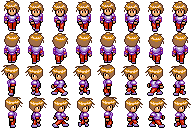
A sprite sheet is a record of every choice the artist made, laid out in a grid. Read in order, it answers questions a tutorial never gets to.
| What to look at | What it teaches you |
|---|---|
| Number of frames per animation | How much motion a cycle actually needs |
| Cell size in pixels | The resolution the style is built for |
| How frames change between cells | Where the motion's weight and timing sit |
| Pixels spent on detail vs. flat areas | What reads at small sizes and what is wasted |
| Palette across the sheet | How few colors a cohesive look really takes |
The frame count one surprises most beginners. A convincing walk cycle is often six to eight frames, not the twenty you might assume. An idle can be two. Seeing that in a real sheet rewrites your instinct about how much work a good animation takes.
How to Actually Study a Sheet
Looking is not studying. Here is a process that turns a sheet into a lesson.
- Count the frames. Per animation, write down the number. Build a mental library of "a run is N frames."
- Measure the cell. Note the pixel dimensions of one frame. This is the resolution the whole style is tuned to.
- Step through the motion. View the frames in sequence and watch what moves and what holds. The held frames are deliberate.
- Strip the color. Imagine the sheet in grayscale. Does the silhouette still read? Good sprites read by shape first.
- Copy one animation. Rebuild a single cycle yourself, frame for frame. You learn more from copying one good walk than from drawing ten mediocre ones.
That fourth point matters more than it sounds. If a sprite only works because of its colors, it falls apart at small sizes or against busy backgrounds. Strong silhouettes are why good pixel art still reads at 16x16.

Reading Animation Timing From a Static Sheet
A sheet looks like a grid of equal cells, but the animation almost never plays at one frame per equal beat. Artists hold key poses longer and rush through transitions. You cannot see that from the grid alone; you have to play it.
Load a sheet into the animation preview, set the frame rate, and watch. Then change the rate and watch again. The difference between 8 and 12 frames per second on the same sheet teaches you more about timing than any chart. We go deep on this in the animation timing and FPS guide.
If a sheet you find is laid out oddly, or packed with padding, you can split it back into individual frames with the sprite sheet splitter and inspect each one cleanly.
Copy to learn, not to ship. Rebuilding someone's walk cycle frame for frame is one of the best exercises in pixel art. Just keep those studies as practice. Check the license before reusing any asset in a real project. Our free assets guide breaks down which licenses allow what.
Build a Reference Habit
Strong artists keep a reference folder. Yours should not be screenshots of finished games (you cannot see the frames). It should be actual sprite sheets, where the grid is visible and every frame is countable.
| Source type | Can you see the frames? | Good for studying? |
|---|---|---|
| Screenshots of games | No | Mood and palette only |
| GIFs of animations | Partly | Timing, not layout |
| Raw sprite sheets | Yes | Everything: layout, count, detail |
| A browsable gallery of sheets | Yes | Studying many sheets fast |
The last row is the point. A gallery of community sprite sheets is a reference folder someone else already filled, sorted, and made browsable. You can move through dozens of real sheets in an afternoon, counting frames and measuring cells, and come out with a working sense of how the medium is actually built.
Study real sprite sheets, then make your own.
Browse sheets from real indie projects in the gallery. Count the frames, read the layouts, and build your reference instinct the fast way.
The Short Version
Tutorials teach the brush. Finished sprite sheets teach the decisions. Count frames, measure cells, play the timing, and copy one good animation by hand. Keep a folder of real sheets, not screenshots, and lean on a gallery when you want to study many at once. When you are ready to build, the editor and the sprite sheet creator turn what you learned into your own work.