Pixel Art Editor
Draw and edit sprites frame by frame in a pixel editor that lives in the same tab as your sheet.
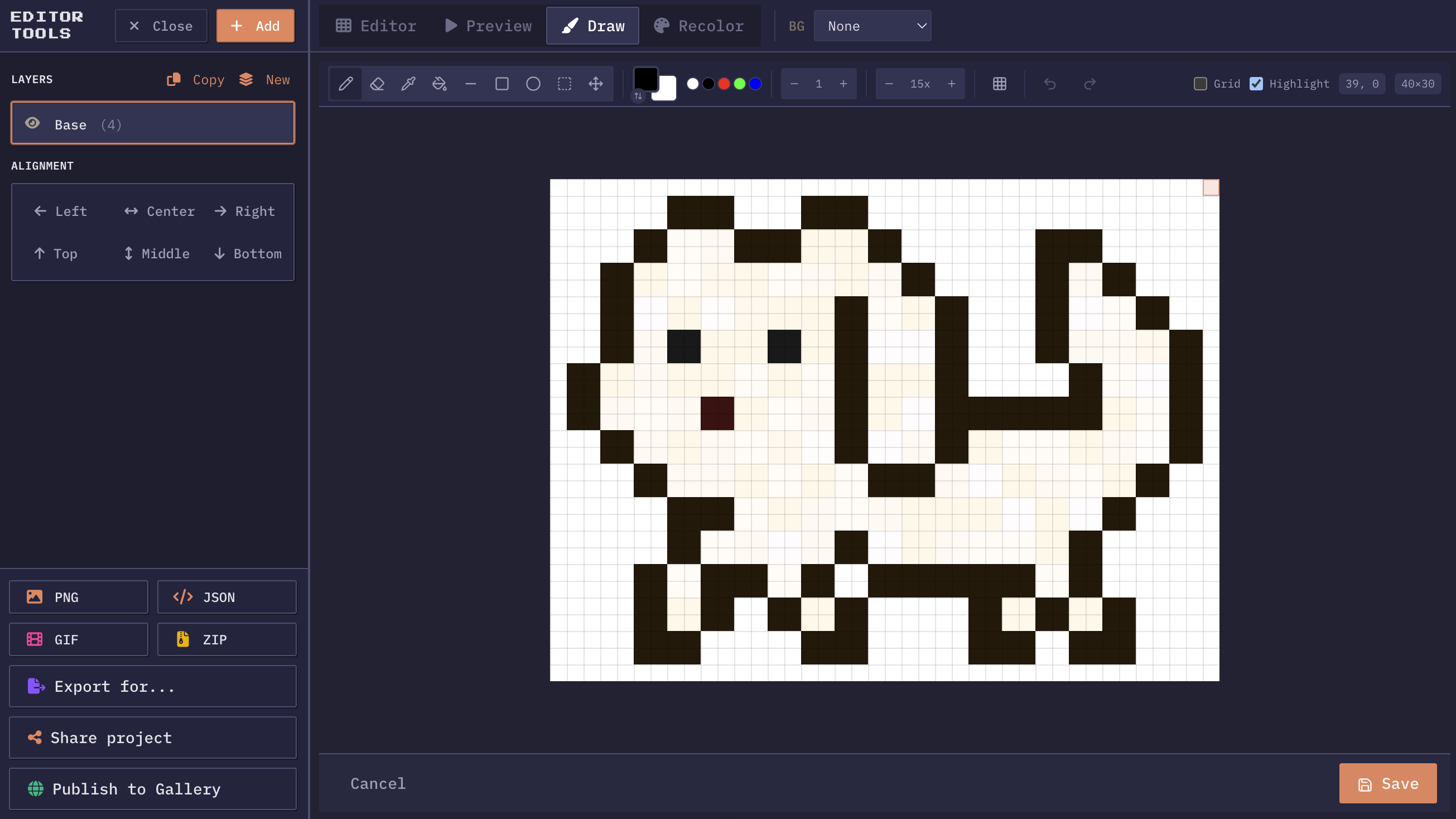
The editor, one frame at a time
The pixel art editor opens on any frame already in your sheet, so a stray pixel gets fixed where it sits instead of in another program. Pencil, eraser, bucket, line, rectangle, and circle, with fill and outline on the shape tools. Colours come off the sprite with the eyedropper and the last ones you used stay within reach. Canvas transforms cover the rest: flip, rotate, scale, resize, trim.
Drawing tools
Pencil, eraser, bucket fill, line, rectangle, and circle, each with adjustable brush size and fill/outline modes.
Color management
Foreground and background colors with one-click swap. Color picker eyedropper and recent color history for fast workflows.
Undo & redo
Full history, so a bad idea costs one Ctrl+Z. Ctrl+Y puts it back if it turns out it was not that bad.
Zoom & pan
Zoom in far enough to place one pixel, out far enough to see whether it helped. Panning works at any zoom.
Canvas transforms
Flip horizontal/vertical, rotate 90°/180°, scale 2x or 0.5x, resize canvas dimensions, and trim transparent edges.
Selection tools
Select rectangular regions, move them, delete them, or copy to new positions. Keyboard shortcuts for quick selection workflows.
Onion skinning
Toggle onion skin to see the previous and next frames as semi-transparent overlays while drawing. Previous frames appear in red, next frames in blue.
Editing where the sheet already is
Most sprite work is not drawing a character from nothing. It is fixing the one pixel on the left boot that flickers, erasing a stray dot the bucket fill left behind, or nudging an outline that looks fine still and wrong in motion. Doing that in a separate application means exporting the frame, opening it, editing, saving, reimporting, and hoping nothing shifted.
Opening the frame in place removes all of that. Right click a sprite on the canvas, edit, apply, and the frame in the sheet is the frame you just changed. The animation preview picks it up straight away, so the loop that showed you the problem is also what tells you the fix worked.
The tools and what each is for
Pencil and eraser with an adjustable size cover most of the work, and at size one they are the only honest way to place a pixel. Bucket fill has a tolerance setting, which matters on art that was scaled or saved as JPG at some point and no longer has flat regions of one exact colour. Raise the tolerance until the fill covers the region and stop before it leaks into the neighbouring one.
Line, rectangle, and circle each come in filled and outline forms. They exist for the shapes that are painful freehand: a straight two pixel weapon edge, a window frame on a tileset, a round shadow under a character. The circle tool in particular saves the guessing, since a pixel circle that looks round at 16 pixels across is not a shape most people get right by hand.
Selection and move handle the structural edits. Box a region, drag it two pixels left, and the rest of the frame stays where it was. That is how you shift a head without redrawing a body.
Onion skinning and why animators keep it on
A frame drawn in isolation looks fine and animates badly. What matters is not how a pose reads on its own but how far and in what direction things moved since the frame before. Onion skinning puts the neighbouring frames behind the one you are editing as translucent ghosts, previous frames in red and next ones in blue, so the spacing between poses is visible while you draw rather than after you export.
It is the fastest cure for drift, the fault where a character creeps sideways across a loop because each frame was drawn a pixel further along than intended. With the previous frame showing through, a foot that should be planted can be kept planted. It also catches uneven spacing in a swing, where two frames are nearly identical and the third jumps.
Shortcuts, transforms, and undo
Pixel work is thousands of small actions, so the keyboard matters more than in most editing.
Keyboard shortcuts
- Tools sit on single letters: P pencil, E eraser, I picker, B fill, L line, R rectangle, C circle, M select, V move.
- Brush size steps with the bracket keys, X swaps the foreground and background colours, and Ctrl+Z and Ctrl+Y run the history in both directions.
Learn six of those and the mouse stops travelling to a toolbar.
Canvas transforms handle the operations that apply to the whole frame. Flip horizontally to build a left facing walk from a right facing one. Rotate in ninety degree steps. Scale by two when the art needs to live on a bigger grid, or by half when it was drawn too large. Resize the canvas to exact dimensions when a frame has to match a cell, and trim to drop the transparent margin.
Everything is undoable
Every one of those is undoable, which is the point. A full history means an experiment costs one keystroke to try and one to abandon, and the sheet underneath is only touched when you apply.
Zoom, canvas size, and staying honest about scale
Pixel art is judged at its display size and edited at ten times that, which is a trap. A face that reads beautifully at 800 percent zoom can be an unreadable smudge at the size a player sees, because at 16 pixels tall there is room for two pixels of eye and nothing else. Zoom out to the real size every few minutes. If it stops reading, no amount of detail added at high zoom will fix it.
Canvas size deserves an early decision rather than a later one. Scaling pixel art after the fact is lossy in a way that photographic images are not: doubling is clean because every pixel becomes four, but scaling by 1.5 invents pixels that no one drew and softens the edges you were careful about. Pick the grid, draw at that grid, and let the engine handle display scale.
The trim operation is the quiet time saver here. It crops the transparent margin off a frame so the sprite is only as big as its content, which keeps the eventual sheet tight and makes alignment decisions explicit instead of accidental.
More questions? See the full FAQ.