Sprite Sheet Editor
Make and edit sprite sheets online, in one tab. Drag your frames in, set the grid, export what your engine reads.
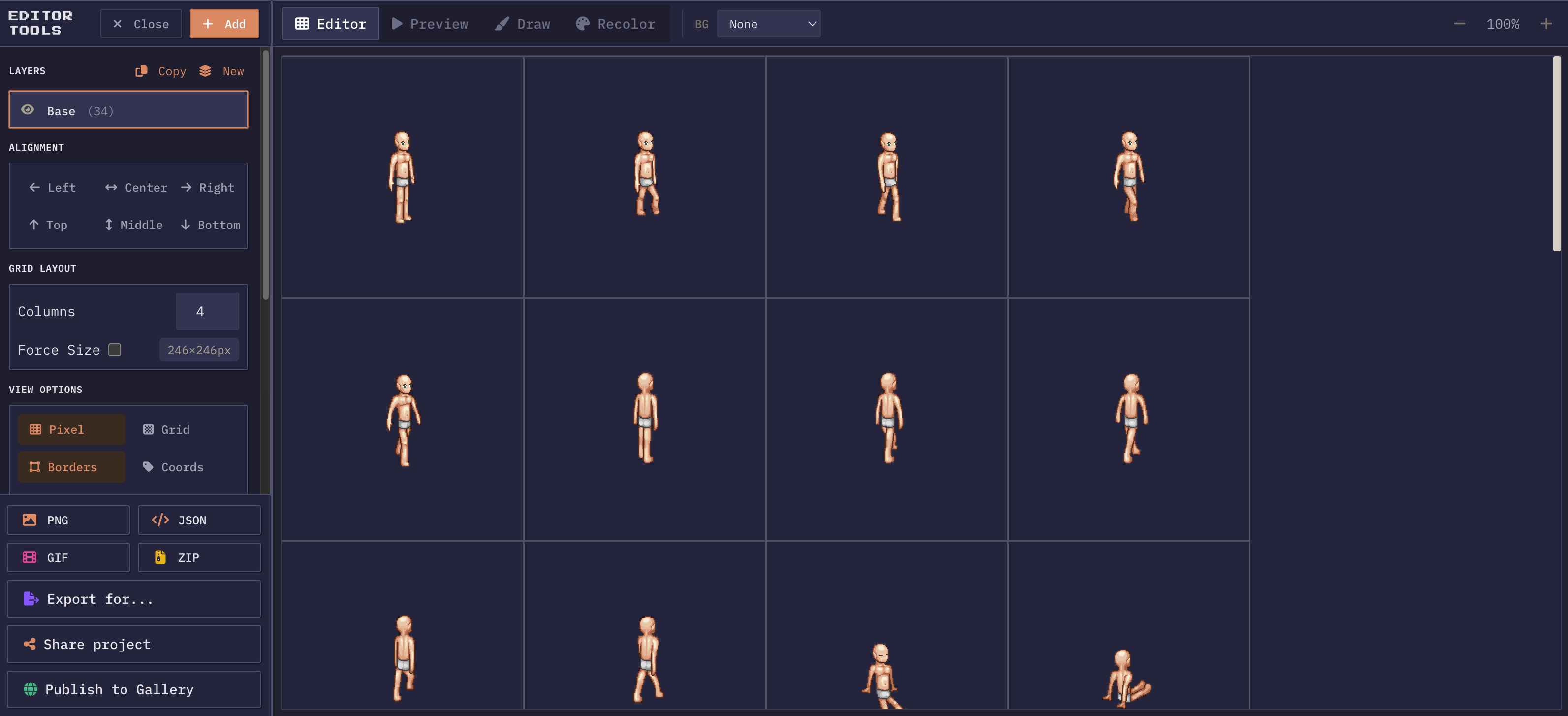
Frames in, packed sheet out
Drop your sprites in and the sprite sheet editor lays them out on a grid straight away. Columns, cell size, and spacing are all yours to change until the layout matches what your engine expects. Layers keep characters, effects, and backgrounds apart while you work; the export flattens them into one sheet with the atlas file beside it.
Drag & drop upload
Upload PNG, JPG, GIF, or JSON files. Drag them directly onto the canvas or browse from your file system.
Automatic grid layout
Sprites are auto-arranged into rows and columns. Adjust the column count and cell dimensions to match your engine.
Multi-layer support
Organize sprites across multiple layers. Toggle visibility, reorder, rename, and lock layers independently.
Negative spacing
Pull cells in past their own edges to eat the transparent padding. Tighter sheet, fewer wasted pixels.
Per-sprite offsets
Fine-tune individual sprite positions with X/Y offsets. Align left, right, center, top, middle, or bottom.
Export anywhere
Download as PNG, JSON atlas, animated GIF, ZIP, or engine-specific formats for Unity, Godot, Phaser, and Tiled.
What a sprite sheet actually buys you
A sprite sheet is one image holding every frame of an animation, or every tile of a set, at known positions. Engines like it because loading one texture and drawing regions out of it costs far less than loading forty small files. Each separate texture means another file read, another GPU upload, and another break in the draw call batch. Pack the same forty frames into a single sheet and the renderer keeps one texture bound while it walks the frames, which is the difference between a smooth 60 frames per second and a stutter every time an effect spawns.
The second reason is bookkeeping. Forty loose files invite forty chances to misname something, and a walk cycle with frame 03 and frame 3 in the same folder will load in an order nobody intended. A sheet fixes frame order in the pixels themselves. Cell four is cell four on every machine, in every engine, forever.
Grid layout versus packed layout
There are two ways to arrange frames and the choice depends on who reads the result. A uniform grid puts every frame in an identical cell, so an engine only needs the cell width, the cell height, and a frame index to find any frame. Unity slicing by cell size, Godot AnimatedSprite2D, and CSS background-position all expect this. It wastes some space when frames differ in size, since the cell has to fit the largest one.
A packed layout drops the uniform cell and fits frames wherever they go, recording each rectangle in a data file. Nothing is wasted, but the engine now needs that data file to make sense of the image. Atlas loaders in Phaser, PixiJS, and Starling work this way.
Which to pick
Build for the grid when your target slices by cell, and pack when your loader reads an atlas. The editor does both, and switching between them is a settings change rather than a rebuild, so a sheet that started as a grid can be exported packed without touching a frame.
Working with layers instead of separate files
Layers exist here for the same reason they exist in a paint program: to keep things that will end up in one image separate while you are still deciding. A character body on one layer, a weapon on another, hit sparks on a third. Toggle a layer off and the canvas shows you what the sheet looks like without it, and toggle it back on when you are done judging.
The time saver
Locking a layer is the small feature that saves the most time. Once the body frames are aligned, lock them, and the drag that would have nudged a body frame two pixels sideways does nothing instead. Renaming matters too, because a few export formats take the animation name from the layer name, so a layer called run comes out with frames named run0000 upward.
A build from empty canvas to engine-ready file
From empty canvas to engine-ready file
- 1Open the editor, drag in your frames, and look at what the automatic grid did. Usually the column count is the only thing worth changing: four columns for a four frame cycle per row, or one long row if your loader expects a horizontal strip. Set the cell size to the frame size your art was drawn at rather than letting it round up, since a cell one pixel too tall shifts every row below it.
- 2Next comes spacing. Padding pushes cells apart, which stops neighbouring frames bleeding into each other when the GPU filters a texture at non-integer scale. Negative spacing pulls them together and eats the transparent margin that most exported frames carry, which shrinks the sheet without touching the art. Preview the animation, step through it once frame by frame, and fix any cell that is off before you export rather than after.
- 3Then export. PNG on its own if the engine slices by cell, or an engine specific format when you want the data file written for you. The layout you leave behind stays put, so exporting a second format later is a couple of clicks.
Cell size, sheet size, and texture limits
Cell size is the one number that touches everything else. Set it to the size the art was actually drawn at and every row lines up, the frame index maths in your engine stays trivial, and nothing is rounded. Set it a pixel or two large and every row below the first is offset by a growing amount, which is the single most common reason a sheet slices wrong on import.
Sheet dimensions matter less than they used to, but not zero. Old mobile hardware and some WebGL contexts cap a texture at 2048 or 4096 pixels on a side, and a sheet past the cap will not upload at all on those devices. Rounding the sheet up to a power of two also used to be mandatory and is now merely occasionally useful, mostly for mipmapping and for a few older engines.
Hitting the limit
If a sheet is getting close to a limit, the fix is usually to split by animation rather than to shrink the art. One sheet for the character and one for the effects loads just as fast as one enormous sheet, and it keeps the frame counts small enough to reason about.
More questions? See the full FAQ.
Start building your sprite sheet
Frames in, packed sheet and atlas out. No install, no account.
Open the editor