Export for Unity & Godot
Export sprite sheets with the data file your engine actually reads. Unity, Godot, Phaser, Tiled, Aseprite, Starling.
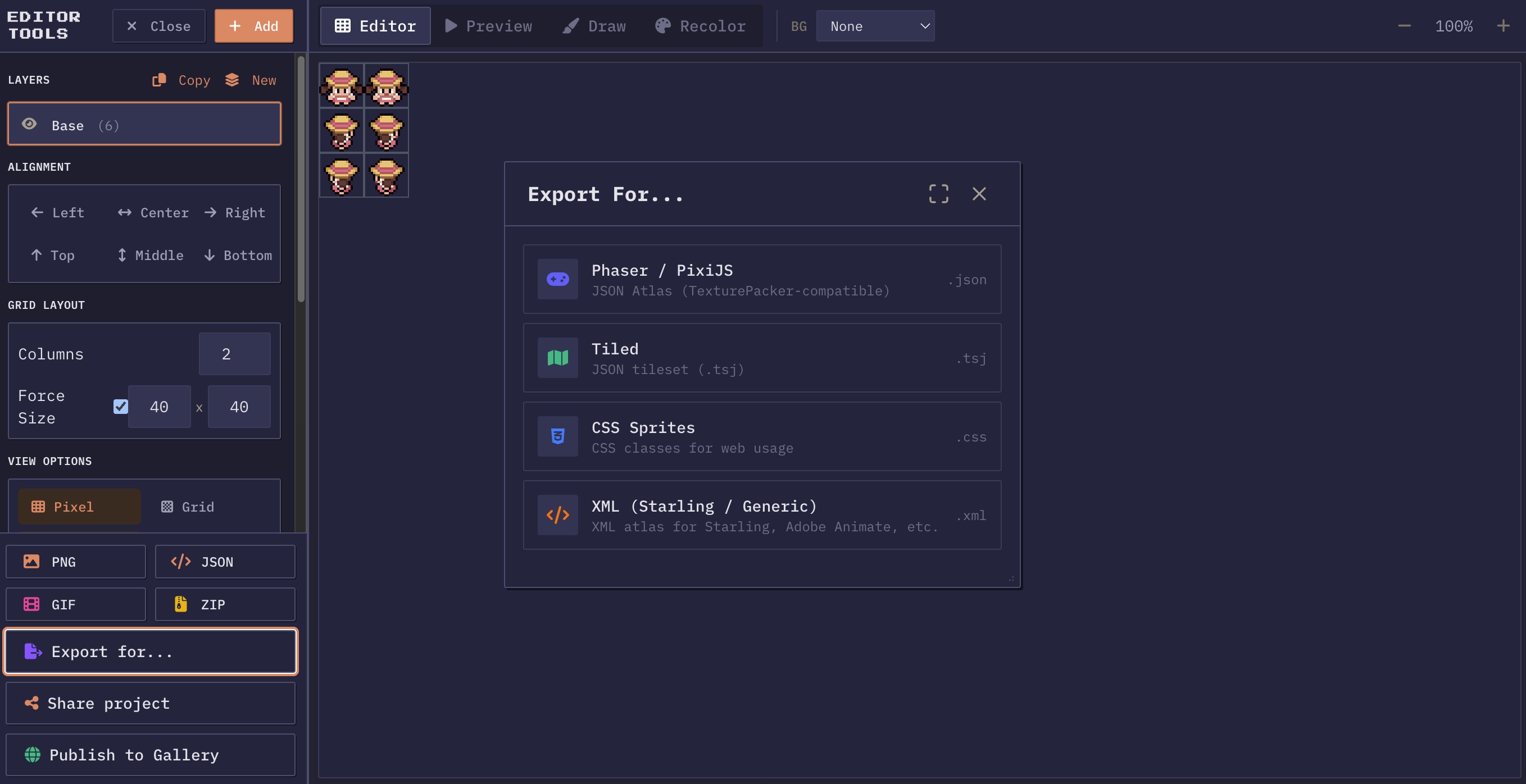
One sheet, every engine
Build the sheet once, export it as many times as you need. Each engine format writes the image plus the data file that goes with it: frame rectangles, cell dimensions, animation names. Unzip that pair into your project and it works. Whatever you export carries every visible layer composited down, with your recolor and spacing already baked in.
PNG sprite sheet
Transparency preserved, no metadata attached. Every engine and every image editor opens it.
JSON atlas
TexturePacker-compatible JSON metadata with frame coordinates. Drop into Phaser, PixiJS, or any atlas-based loader.
Animated GIF
Your animation as a GIF at the FPS you pick. Useful for a devlog post or an issue thread where nobody wants to clone the project.
Tiled tileset (.tsj)
Tiled Map Editor tileset format. Use your sprites directly in Tiled for level design and tile-based games.
Sparrow / Starling XML
A TextureAtlas XML file with one SubTexture entry per frame, named from the animation you set at export time. Starling, Adobe Animate, and Friday Night Funkin mods read this.
CSS sprites
CSS classes for each sprite with background-position offsets. Use sprites directly on the web without JavaScript.
ZIP download
Download all individual frames as separate PNGs in a ZIP archive. Includes metadata JSON for reconstruction.
Aseprite format
Export an Aseprite-compatible JSON atlas with frame durations, tags, and layer data. Import the sprite sheet directly into Aseprite for further editing.
Godot SpriteFrames (.tres)
Export a Godot 4 SpriteFrames resource file with AtlasTexture regions. Drop it into your Godot project alongside the PNG.
The image is half of a sprite sheet
A PNG holds the pixels and nothing else. Where one frame ends and the next begins, which frames belong to which animation, how fast they play: none of that is in the image. Some engines do not need it, because they slice on a uniform grid and count cells. Others need a data file describing each frame rectangle by name, and without it the sheet is a single large picture as far as the loader is concerned.
That data file is the atlas, and the disagreement between engines is almost entirely about its shape rather than its content. Every format here writes the same frame information in whatever structure the target expects, which is why the export menu is a list of engines rather than a list of file types.
Picking the right export for your target
What to hand each target
- For Unity, take the plain PNG. The Sprite Editor slices by cell size natively, so a uniform grid plus Sprite Mode set to Multiple gives you the frames with no third party importer involved.
- For Godot 4, the SpriteFrames resource is the shortcut: it arrives as a .tres holding AtlasTexture regions, drops next to the PNG in your project, and assigns straight onto an AnimatedSprite2D.
- For Phaser and PixiJS, use the JSON atlas. Both read the TexturePacker layout out of the box, so the loader call is one line and frames are addressed by name.
- For Starling, Adobe Animate, and Friday Night Funkin mods, the Sparrow XML export writes one SubTexture per frame with the naming those runtimes match animations against.
- Tiled gets a .tsj tileset so sprites can be painted into a level directly.
- On the web with no framework, the CSS export gives you a class per sprite with the background offsets already worked out.
When nothing on the list matches, the ZIP of individual frames is the universal answer. Any tool that can read a folder of PNGs can read that, and the metadata JSON in the archive is enough to rebuild the layout later.
What gets baked in at export time
Exports composite every visible layer down into one image. Layers you hid are absent, not merely underneath, so a sheet exported with the effects layer off has no effects in it. Recolor settings are applied rather than stored, which means a hue shifted export ships the shifted colours and the project keeps the originals. Cell size, padding, and any negative spacing you set are already resolved in the pixel positions.
The consequence is worth stating plainly: the export is a snapshot of the canvas as it looks, and the editable version lives in your project file. Save the project if you want to come back and change the arrangement. Keep the export for the engine.
Frame naming matters for the formats that carry names. Several take the animation name from the layer, so a layer called idle yields idle0000, idle0001, and onward. Rename the layer before exporting and the frames come out matching the animation names your code already uses.
Exporting more than once, and reimporting later
Formats are exported one at a time, but the sheet is untouched in between, so a second or third format is a few clicks rather than a rebuild. Shipping to a web build and a desktop build with different loaders is a normal reason to want two. So is handing an artist a GIF while the programmer takes the atlas.
For the return trip, the JSON project file is the one to keep. It restores layers, cell settings, frame order, and recolor state, which no engine format does, because an engine format only needs enough to draw. Keep the project next to the exports and next months change to one frame stays a five minute job.
Naming and versioning the files you ship
Rename both, or re-export
A sheet and its data file are a pair, and the pair breaks the moment one of them is renamed. Atlas formats reference the image by filename from inside the data file, so hero_run.png next to hero_run.json works and renaming the PNG alone leaves the loader looking for a file that no longer exists. Rename both, or re export.
Give the pair a name that says what it holds and at what size, since a project accumulates sheets faster than anyone expects. Something like hero_run_32.png beats sheet2_final.png in six months. Keep the frame size in the name if your project mixes grids, and drop words like final entirely, because there is no such thing.
For version control, the PNG is a binary blob that will not diff, so a change to one frame rewrites the whole file in history. That is fine and normal. What is worth committing alongside it is the project JSON, because it is the only artifact that records how the sheet was assembled rather than what it looks like.
More questions? See the full FAQ.
Export your sprite sheet
Pick your engine from the Format dialog and the atlas is written for you.
Open the editor