Tileset Generator for Tiled
Pack your tiles into one image and export a JSON tileset. Tiled opens the .tsj with the tile size, column count, and tile count already set.
Format menu
Tiled
JSON tileset (.tsj)
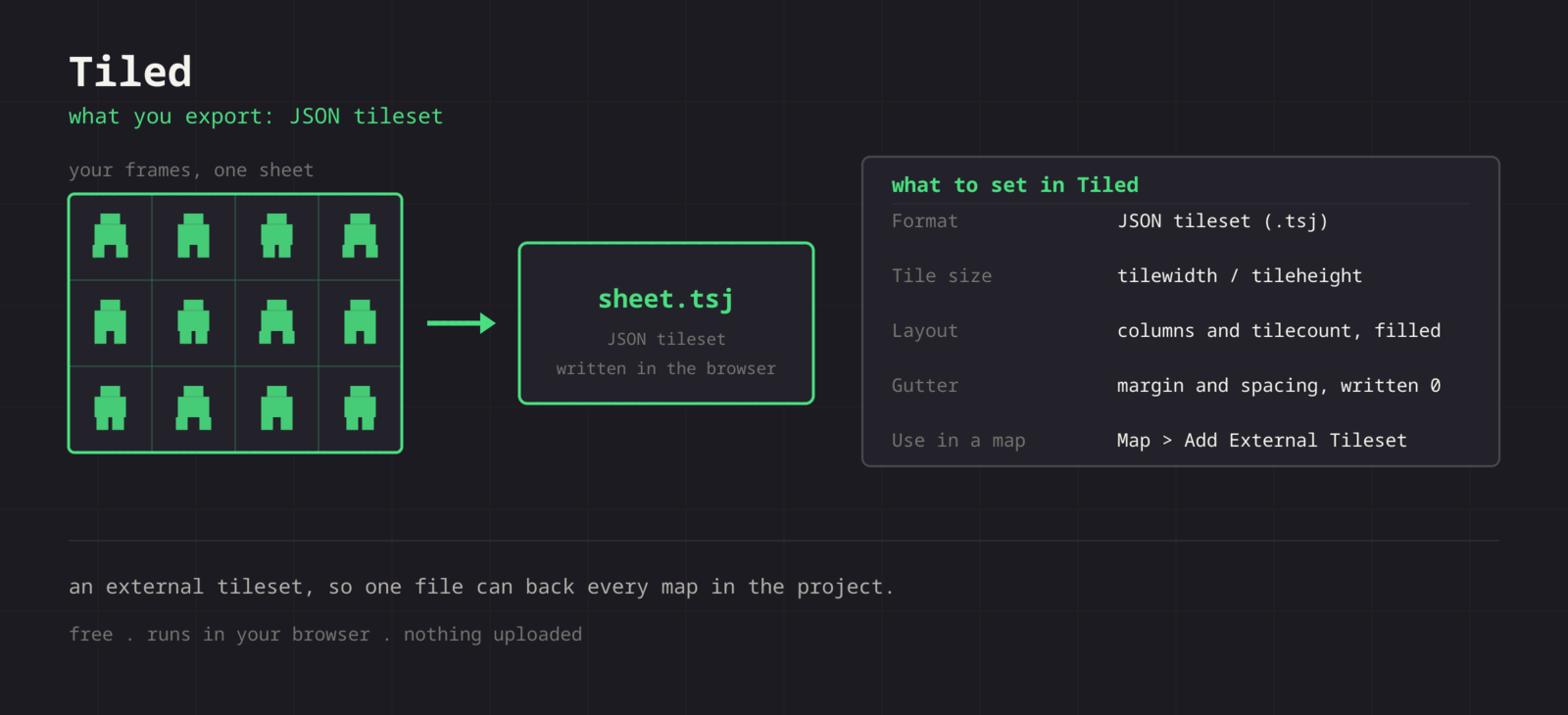
The Tiled export writes a JSON tileset describing the sheet: tile width and height, column count, tile count, image dimensions, and the image file name. Open the .tsj in Tiled or add it as an external tileset to a map, and the grid is already correct. Margin and spacing are written as 0, so export the tileset with no gutter.
Getting the sheet into Tiled
- 1
Export with zero gutter
Tilesets want tiles edge to edge. Set spacing to 0 and keep every cell the same size, then export the PNG.
- 2
Export the .tsj
Use Format > Tiled to write the JSON tileset next to the PNG. It references the image by file name, so keep them together.
- 3
Open it in Tiled
File > Open in Tiled, or from a map use Map > Add External Tileset and pick the .tsj.
- 4
Paint
The tileset panel shows every tile at the right size. Terrain, Wang sets, and tile properties can be layered on from here.
| Setting | Tiled value |
|---|---|
| Format | JSON tileset (.tsj) |
| Tile size | tilewidth / tileheight, from your cell size |
| Layout | columns and tilecount, filled in |
| Gutter | margin and spacing written as 0 |
| Use in a map | Map > Add External Tileset |
Ready-made .tsj
No New Tileset wizard, no retyping tile size. The file already describes the grid it came from.
External tileset
A standalone .tsj can be shared across many maps, so edits to the tileset propagate everywhere.
Uniform cells
Tiled needs a regular grid. The packer keeps cells identical, which is exactly what a tileset needs.
Split then rebuild
Got an existing tileset? Split it into tiles, rearrange or recolour, and export a fresh sheet with a matching .tsj.
When the sheet fights Tiled
Tiled warns that the image size does not match the tileset
- Cause
- The .tsj stores imagewidth, imageheight, columns, and tilecount. Replacing the PNG with one of a different size leaves those numbers describing an image that no longer exists.
- Fix
- Re-export both files together whenever the grid changes. If only the artwork changed and the dimensions are identical, replacing the PNG alone is safe and keeps any collision data you authored.
Painted tiles show slivers of their neighbours
- Cause
- The image has a gutter but the tileset declares margin and spacing as zero, so every tile rect is offset from the art it should contain.
- Fix
- Export tilesets with spacing set to 0. If you need bleeding protection for a scaling renderer, add it in the engine that consumes the map rather than in the tileset image.
A map opens with the tileset missing
- Cause
- A map references an external tileset by relative path, so moving the .tsj, or opening the map from a different directory, breaks the link.
- Fix
- Keep the map, the .tsj, and the PNG in a stable folder structure and commit them together. Tiled will offer to locate a missing tileset, and pointing it at the file once repairs the reference.
Tile ids shift and an existing map fills with the wrong tiles
- Cause
- Ids are assigned by position, left to right and top to bottom. Inserting a tile in the middle renumbers everything after it.
- Fix
- Append new tiles at the end of the sheet and keep the column count constant. Adding a full row at the bottom leaves every existing id untouched.
Tiles look correct but twice the size you expect
- Cause
- The sheet was exported at a scaled resolution, so the declared tile size describes the scaled image rather than the source grid.
- Fix
- Export at one to one and let the map or the engine handle display scale. Tiled renders at the tile size in the tileset, so scaling belongs downstream.
Collision shapes and terrain sets disappear after a re-export
- Cause
- The export writes a fresh .tsj, which overwrites the file where Tiled stored the data you authored on top of the tiles.
- Fix
- Once you start authoring in Tiled, treat the .tsj as yours. Export a new one to a different name and copy across only the geometry you need, or replace the PNG alone when the grid has not changed.
The tileset panel shows blank tiles at the end
- Cause
- The declared tile count fills the grid, so any empty cells left in the sheet become real but transparent tiles.
- Fix
- Trim the sheet to whole rows of actual tiles before export. Blank tiles are harmless when painting but confusing to anyone else opening the map, and they still occupy ids.
What changes between Tiled versions
- Tiled 1.x
- Both tileset formats are read: .tsx is XML and .tsj is JSON. The JSON variant is the friendlier one when something else in your pipeline also parses the file, since almost every language ships a JSON reader.
- External versus embedded
- An external tileset can be shared across many maps, so a fix propagates everywhere. Embedding it in one map is simpler for a jam project and painful the moment a second map needs the same tiles.
- Engine importers
- Godot, Phaser, LibGDX, and Unity all have Tiled map importers, and most of them expect the tileset alongside the map. Keeping the .tsj external is what makes those importers work without hand editing.
- Object templates
- A tileset is a grid of images, which Tiled is happy to use for object sprites as well as tile layers. The same export therefore covers decorations and NPC markers, not just terrain.
- Version control
- JSON tilesets and maps diff far better than the XML variants, which makes .tsj the friendlier choice on a team. Commit the PNG, the .tsj, and the maps together so a checkout is always internally consistent.
Want the long version? Read the engine import guide, or see every export format.
Export for Tiled
Pack your frames in the browser. What you walk away with: JSON tileset (.tsj), ready for Tiled.