Sprite Sheet Generator for Defold
Defold builds its own atlases, so it wants a clean grid PNG. Export one, point a Tile Source at it, and define your animation groups.
Format menu
PNG
Uniform PNG grid
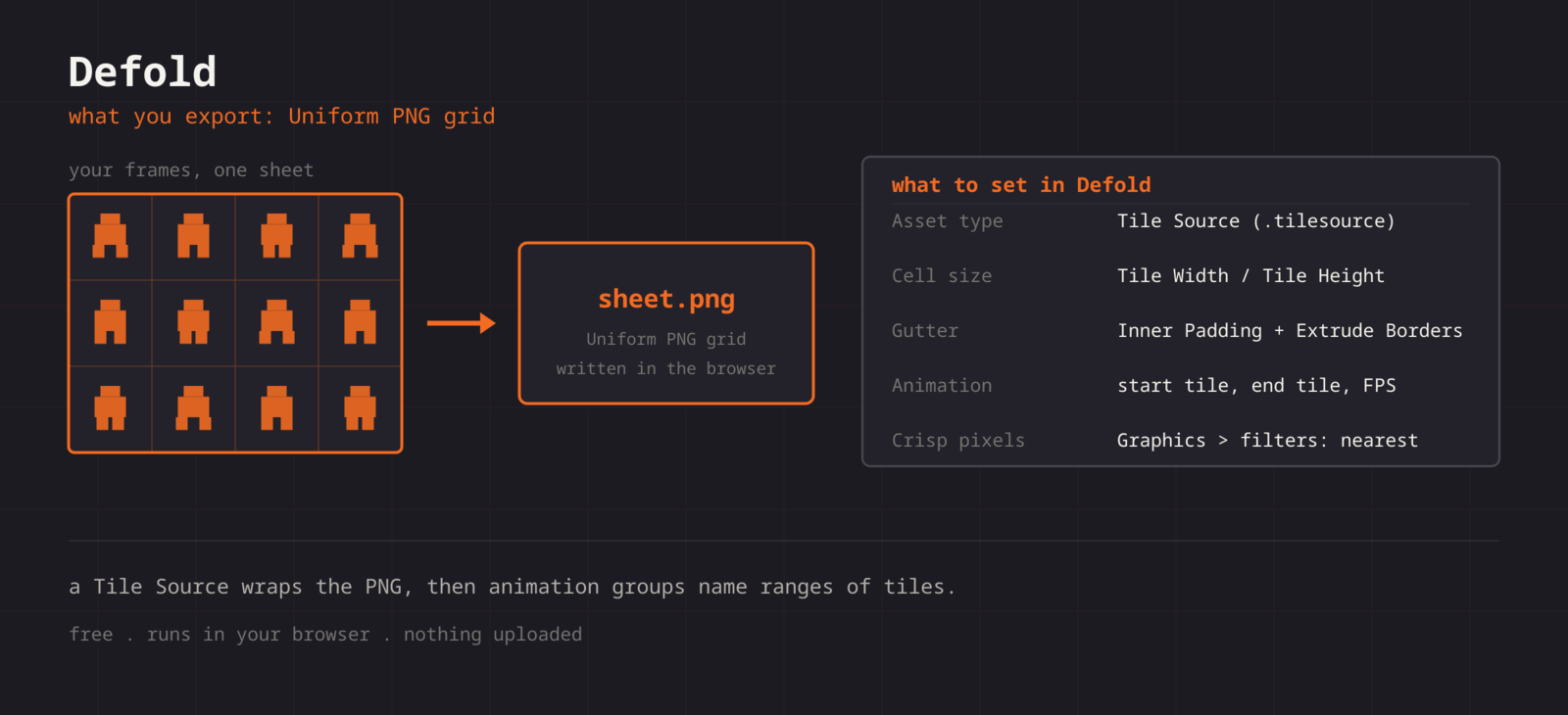
Defold has two asset paths. An Atlas takes individual images and packs them itself, and a Tile Source takes one grid sheet and cuts it by tile size. For a sheet built here, Tile Source is the direct route: tile width, tile height, and optional margin and spacing are the only inputs, and animation groups are defined on top of the resulting tiles.
Getting the sheet into Defold
- 1
Export a uniform grid
Keep cells identical and note the cell size plus any gutter. Export the PNG.
- 2
Add it to the project
Drop the PNG into your Defold project folder. It shows up in the assets pane immediately.
- 3
Create a Tile Source
New > Tile Source, set Image to your PNG, and set Tile Width and Tile Height to your cell size. Set Inner Padding and Extrude Borders if you exported a gutter.
- 4
Define animation groups
In the tile source, add an Animation, set start and end tile, FPS, and playback mode.
- 5
Point filtering
In game.project under Graphics, set the default texture min and mag filter to nearest so pixel art stays sharp.
function init(self)
    sprite.play_flipbook("#sprite", "idle")
end

function on_input(self, action_id, action)
    if action_id == hash("right") then
        sprite.play_flipbook("#sprite", "walk")
    end
end| Setting | Defold value |
|---|---|
| Asset type | Tile Source (.tilesource) |
| Cell size | Tile Width / Tile Height |
| Gutter | Inner Padding, plus Extrude Borders |
| Animation | Animation group: start tile, end tile, FPS |
| Crisp pixels | game.project > Graphics > filters: nearest |
Regular grid guaranteed
Tile Source assumes every tile is the same size. The packer here gives you exactly that.
Predictable tile indices
Tiles number left to right, top to bottom, which is the frame order you arranged, so animation start and end indices are easy to read off.
Padding you can declare
Whatever gutter you export becomes the Inner Padding value. No reverse-engineering the sheet.
Timing preview
Preview the loop at your target FPS before you set it on the animation group.
When the sheet fights Defold
play_flipbook reports that the animation does not exist
- Cause
- The animation id is the name of the animation group inside the tile source, hashed at runtime. A typo or a stale name fails silently until the call is made.
- Fix
- Copy the group name from the tile source rather than typing it, and keep names lower case with underscores so the hash is predictable across your codebase.
The animation starts on the wrong pose
- Cause
- Tile indices in a tile source start at one, not zero, and they run left to right then top to bottom.
- Fix
- Read the start and end tile off the tile source view rather than calculating them. A four frame walk on the second row of a four column sheet is tiles five through eight.
Thin seams appear between tiles in a tilemap
- Cause
- Adjacent tiles are sampled at their shared edge, and with no extrusion the sampler picks up the neighbouring tile or the transparent background.
- Fix
- Set Extrude Borders to one or two in the tile source. Extrusion is generated at build time, so this costs nothing in your source sheet and does not change the tile size.
The sprite is bigger or smaller than the tile
- Cause
- A sprite component takes its size from the image by default, but a manually set size or a scaled game object overrides it.
- Fix
- Leave the sprite size automatic and scale the game object only in whole numbers. Fractional scale on pixel art produces uneven pixels no filter setting can rescue.
Pixel art is soft in one build target but not another
- Cause
- The texture filters are project settings in game.project, and a platform-specific override or an old bundle can carry different values.
- Fix
- Set default_texture_min_filter and default_texture_mag_filter to nearest in game.project, then rebundle rather than hot reloading, since filter state is set when the texture is created.
Build size grows faster than the art you added
- Cause
- Duplicate frames and wide transparent margins both survive into the tile source, because a tile source cannot trim.
- Fix
- Drop repeated poses and trim the sheet before export. An Atlas built from individual frames is the alternative when trimming matters more than having one grid image.
What changes between Defold versions
- Defold 1.4 and later
- Tile sources take tile width, tile height, inner padding, and extrude borders, and animation groups carry start tile, end tile, playback mode, and FPS. These fields have been stable across recent releases.
- Tile Source versus Atlas
- A tile source cuts one grid image. An atlas packs loose images and can trim them. Both feed a sprite component, so the choice is about the shape of your source art rather than about runtime behaviour.
- Tilemaps
- A tilemap component needs a tile source, not an atlas, which makes the grid export the only route for level tiles. Keep the tile size a power of two if you intend to reuse the same source for both tiles and sprites.
- HTML5 and mobile targets
- Defold builds a texture per tile source, so several small sheets load more predictably on the web than one very large image. Split per character or per level rather than shipping a single atlas of everything.
- Live update and collections
- Because a tile source is a build resource, swapping art means a new bundle unless the sheet ships through Live Update. Group sheets by the collection that loads them so an update replaces one archive rather than the whole game.
Want the long version? Read the engine import guide, or see every export format.
Export for Defold
Pack your frames in the browser. What you walk away with: Uniform PNG grid, ready for Defold.