Sprite Sheet Generator for Phaser 3
Export a JSON atlas Phaser loads with one line, or a plain grid PNG for load.spritesheet. Both paths, no build step, no TexturePacker licence.
Format menu
Phaser / PixiJS
JSON atlas (TexturePacker format)
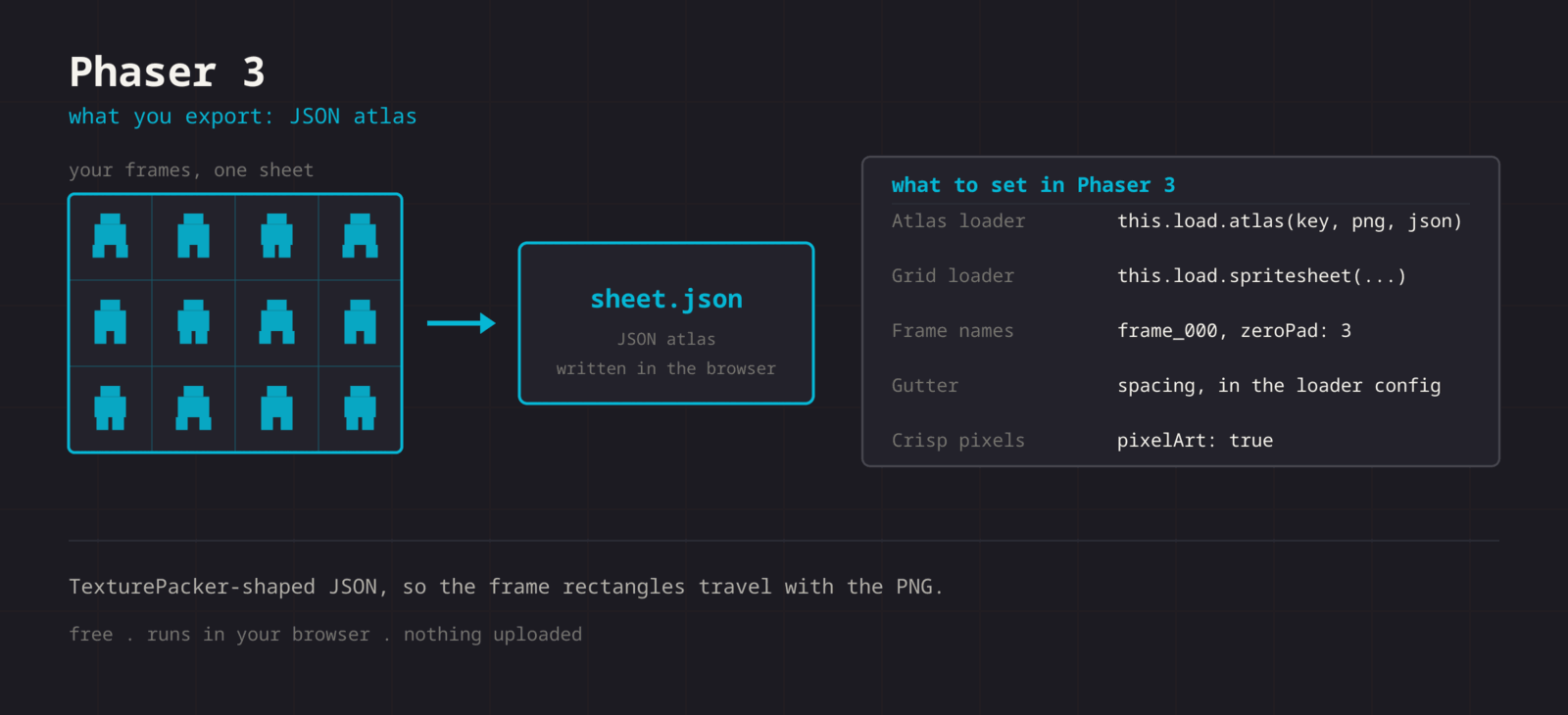
The Phaser export writes a TexturePacker-format JSON atlas: every frame keyed by name with its frame rect, source size, and trim data. Phaser reads it natively through load.atlas, so frame positions never depend on you retyping a grid. If you prefer the grid path, the same PNG also works with load.spritesheet.
Getting the sheet into Phaser
- 1
Export the PNG and the JSON
Export the sheet as PNG, then use Format > Phaser / PixiJS for the atlas JSON. Keep both file name stems the same.
- 2
Load the atlas
In preload(), call this.load.atlas with the texture key, the PNG path, and the JSON path.
- 3
Build the animation
Frames are named frame_000, frame_001, and so on. Use generateFrameNames with a zero-padded prefix, or generateFrameNumbers if you loaded the grid instead.
- 4
Turn on pixelArt
Set pixelArt: true in the game config so the renderer uses nearest-neighbour sampling globally.
// Atlas path (recommended)
function preload() {
  this.load.atlas('hero', 'hero.png', 'hero.json');
}

function create() {
  this.anims.create({
    key: 'walk',
    frames: this.anims.generateFrameNames('hero', {
      prefix: 'frame_',
      start: 0,
      end: 7,
      zeroPad: 3,
    }),
    frameRate: 12,
    repeat: -1,
  });

  this.add.sprite(100, 100, 'hero').play('walk');
}

// Grid path, if you exported the PNG only
this.load.spritesheet('hero', 'hero.png', {
  frameWidth: 32,
  frameHeight: 32,
  spacing: 2, // your gutter
});| Setting | Phaser value |
|---|---|
| Atlas loader | this.load.atlas(key, png, json) |
| Grid loader | this.load.spritesheet(key, png, config) |
| Frame names | frame_000, zeroPad: 3 |
| Gutter | spacing in the loader config |
| Crisp pixels | pixelArt: true in the game config |
TexturePacker-compatible
The same JSON shape Phaser has read for years, so every atlas tutorial and plugin still applies.
Trim data included
Trimmed frames carry spriteSourceSize and sourceSize, so Phaser re-inflates them to their original footprint.
No build step
Two static files next to your other assets. No CLI, no watcher, no licence key.
Grid path too
Prefer load.spritesheet? Export the uniform PNG and pass frameWidth, frameHeight, and spacing.
When the sheet fights Phaser
The console reports a 404 for the texture while loading the atlas
- Cause
- load.atlas takes the image path as an argument, and the JSON also names the image internally. A mismatch between the two, or a path relative to the wrong base, misses the file.
- Fix
- Pass both paths explicitly to load.atlas and keep the PNG and JSON in the same directory with the same stem. Check the network tab for the URL Phaser actually requested.
The animation plays once and freezes on the last frame
- Cause
- repeat defaults to 0, which means play the sequence a single time.
- Fix
- Set repeat to -1 for an endless loop, or to a positive count for a fixed number of cycles. For a one-shot that should rest on a pose, keep repeat at 0 and set the idle animation in the animationcomplete handler.
Frames drawn through load.spritesheet include a strip of the neighbour
- Cause
- The grid loader assumes no gaps unless you tell it otherwise, so an exported gutter shifts every frame after the first.
- Fix
- Pass spacing, and margin if the sheet has an outer border, in the loader config. Or switch to the atlas path, where the rects are explicit and spacing is irrelevant.
Sprites look soft even with pixelArt enabled
- Cause
- pixelArt sets nearest sampling but does nothing about sprites landing on fractional coordinates, which is what a moving camera produces.
- Fix
- Add roundPixels: true to the game config alongside pixelArt: true. For a camera that follows a body, roundPixels on the camera keeps the whole scene on whole pixels.
The animation speed does not match what you previewed
- Cause
- frameRate and duration are two ways to say the same thing, and setting duration overrides frameRate silently.
- Fix
- Set frameRate to the number you previewed at and leave duration undefined. If a designer wants a total length instead, set duration alone and let Phaser derive the rate.
Trimmed frames appear to bob up and down
- Cause
- The atlas restores the original footprint, but the origin is applied to that footprint, so an inconsistent origin across animations reads as vertical drift.
- Fix
- Call setOrigin once with the same values for every animation of a character, typically 0.5 and 1 for something standing on the ground, and let the trim data handle the rest.
Switching animations restarts the sprite from a jarring pose
- Cause
- play interrupts the current animation immediately, so a run that cuts to an idle mid-stride jumps rather than settles.
- Fix
- Use playAfterRepeat or playAfterDelay when the current cycle should finish first, and keep the first frame of each animation close in silhouette to the last frame of the animation that usually precedes it.
What changes between Phaser versions
- Phaser 3
- load.atlas has read this JSON shape since Phaser 3.0. Every atlas tutorial written for Phaser 3 applies unchanged, including generateFrameNames, play, and the animationcomplete event.
- Phaser 4
- The loader signature and the TexturePacker JSON format carry over. Code that loads and animates the atlas needs no change; only unrelated parts of the framework moved.
- Phaser 2 and CE
- The old versions read a TexturePacker JSON Hash or Array too, through load.atlasJSONHash. The file works, but the animation API is different, so follow a Phaser 2 tutorial for the play calls.
- Bundlers and static hosting
- The output is two static files. With Vite or webpack, put them in the public directory rather than importing them, so the runtime paths stay predictable and the JSON is not inlined into the bundle.
- Scale manager and pixel art
- The scale manager can put the canvas on a fractional zoom, which softens sprites no matter what the renderer settings say. Pick an integer zoom, or Scale.FIT with a resolution that divides your design size cleanly.
Want the long version? Read the engine import guide, or see every export format.
Export for Phaser
Pack your frames in the browser. What you walk away with: JSON atlas (TexturePacker format), ready for Phaser.