Sprite Sheet Generator for Construct 3
Construct imports sprite strips by cell count, not by metadata. Export a tight, evenly spaced sheet and the animation editor splits it in one dialog.
Format menu
PNG
Uniform PNG strip, zero gutter
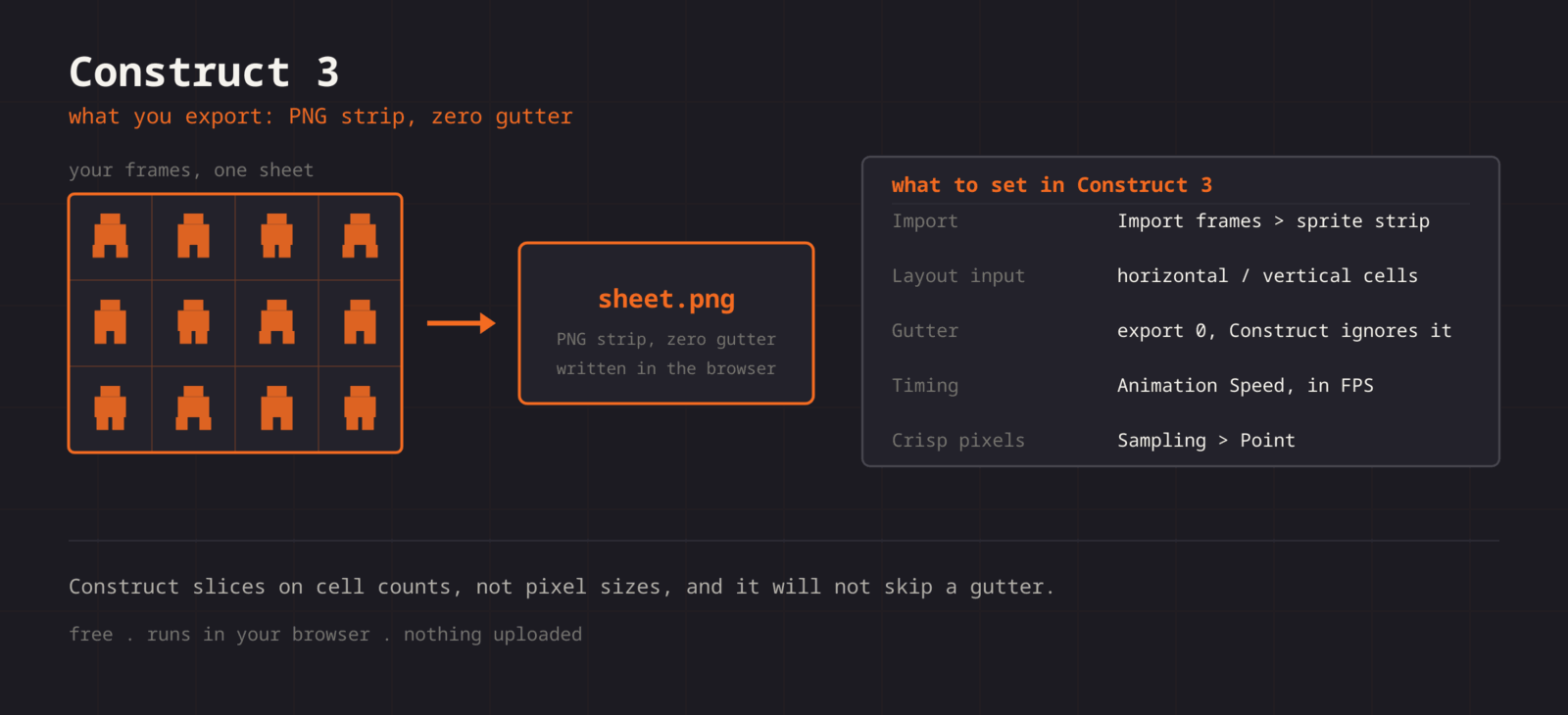
Construct splits a strip by horizontal and vertical cell count, and it does not ask about padding. That makes the rule simple: export with the gutter set to zero and a perfectly uniform grid. Construct then divides the image evenly and every frame lands on the pixel. Construct adds its own bleeding protection when it builds the runtime spritesheet, so you lose nothing by dropping the gutter.
Getting the sheet into Construct 3
- 1
Export with zero gutter
Set spacing to 0 and keep the grid uniform. Note the number of columns and rows.
- 2
Add a Sprite object
Insert a Sprite into the layout. The Animations editor opens automatically.
- 3
Import from strip
Right-click the frames pane and choose Import frames > From sprite strip. Pick the PNG and enter your horizontal and vertical cell counts.
- 4
Set speed and loop
In the animation properties, set Speed in frames per second and tick Loop if the animation cycles.
- 5
Point sampling
Project Properties > Sampling > Point disables smoothing across the whole project.
| Setting | Construct 3 value |
|---|---|
| Import | Import frames > From sprite strip |
| Layout input | Horizontal and vertical cell count |
| Gutter | Export with 0, Construct ignores padding |
| Timing | Animation Speed, in FPS |
| Crisp pixels | Project Properties > Sampling > Point |
Exact cell counts
The editor tells you columns and rows, which are literally the two numbers the import dialog asks for.
Zero-gutter export
Drop the spacing to 0 and the strip divides evenly. No padding maths, no half-pixel frames.
GIF to strip
Drop an animated GIF in, get every frame extracted, and export the strip Construct wants.
Timing preview
Confirm the loop reads right before you type a Speed value into Construct.
When the sheet fights Construct 3
Every imported frame has an empty border around the art
- Cause
- The sheet was exported with spacing, and the importer divides the image evenly without any notion of a gutter.
- Fix
- Re-export with spacing set to 0. Nothing is lost, because Construct adds its own bleeding protection when it builds the runtime spritesheet at export time.
The animation plays once and stops on the final frame
- Cause
- Loop is off by default on a new animation, and Speed is a separate field that is easy to leave at its default too.
- Fix
- Select the animation in the Animations editor, tick Loop, and set Speed to the frames per second you previewed. Ping-pong is a checkbox there as well, which saves exporting a reversed copy of the frames.
The collision polygon only fits the first frame
- Cause
- Construct generates a collision polygon per frame, and the automatic shape is derived from the pixels of whichever frame was active.
- Fix
- Set the polygon on a representative frame, right-click it, and apply it to all frames of the animation. A single polygon across a cycle is also cheaper at runtime than a per-frame one.
Image points drift between frames
- Cause
- Origin and image points are per-frame properties, so an imported strip starts with every frame using the same default position rather than one you chose.
- Fix
- Place the origin on the first frame, then right-click and apply it to the whole animation. Do the same for any named image point, such as a muzzle or a hand.
Pixel art is crisp in the editor and soft in the exported game
- Cause
- Sampling is a project property and fullscreen scaling can land the canvas on a non-integer scale factor, which softens everything regardless of sampling.
- Fix
- Set Sampling to Point and choose an integer-scaling fullscreen mode. Letterbox integer scale trades a border for exact pixel doubling, which is usually the right deal for pixel art.
Memory use climbs with the number of animations
- Cause
- Frames are held as separate images in the editor and repacked at export, so redundant frames cost memory on every platform.
- Fix
- Delete duplicated poses and trim transparent margins before export. On mobile projects, also split rarely used animations into a separate object so they are not resident from the first layout.
The imported animation is named Default and cannot be found by name
- Cause
- Importing a strip fills the animation that is currently selected, which on a new Sprite object is the one called Default.
- Fix
- Rename the animation in the Animations editor before you write any events, and use the same name in Set animation actions. Renaming later means editing every event that references the old name.
What changes between Construct 3 versions
- Construct 3
- Import Frames From Sprite Strip takes a horizontal and a vertical cell count. Both numbers are shown in the editor before you export, so the dialog is two fields rather than a measuring exercise.
- Construct 2
- The older editor has the same strip importer with the same two inputs. A zero-gutter uniform sheet imports the same way, which makes this export safe for legacy projects.
- Runtime spritesheeting
- Construct builds its own spritesheet when the project is exported, so how tightly you pack here has no effect on the shipped download size. Frame count and image dimensions are what matter.
- Tilemaps
- The Tilemap object wants a tile sheet with no spacing and identical tiles, which is the same export with a different intent. Set the tile size in the Tilemap properties to the cell size you exported.
- Mobile and web exports
- Construct repacks frames for each export target, so a sheet that is comfortable in the editor can still be heavy on a phone. Frame count and image dimensions drive that cost, which is why dropping duplicates matters more than tight packing.
Want the long version? Read the engine import guide, or see every export format.
Export for Construct 3
Pack your frames in the browser. What you walk away with: Uniform PNG strip, zero gutter, ready for Construct 3.