Sprite Sheet Generator for GameMaker
Pack your frames into an evenly spaced sheet and bring it into GameMaker with the strip importer. Frame size, cells per row, and separation all line up.
Format menu
PNG
Uniform PNG strip or grid
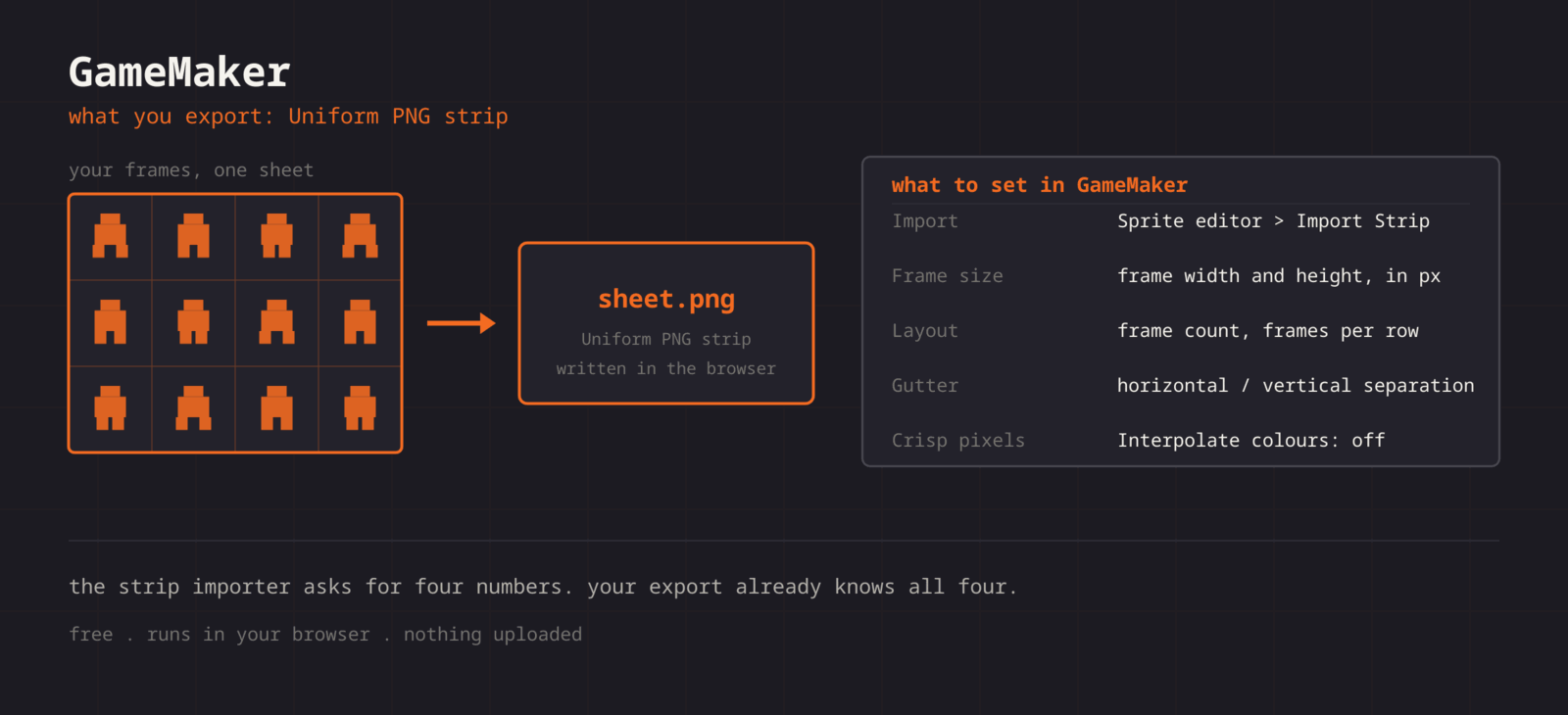
GameMaker does not read third-party atlas metadata, so the sheet carries the layout. Export a uniform PNG and the strip importer rebuilds your frames from three numbers: frame width, frame height, and how many cells sit per row. GameMaker builds its own texture pages at compile time, so packing tightness on your side does not matter, only that the grid is regular.
Getting the sheet into GameMaker
- 1
Export a uniform sheet
Keep every cell the same size. Note the cell width, cell height, frames per row, and gutter before exporting the PNG.
- 2
Create the sprite
In the asset browser, create a new Sprite, then choose Import in the sprite editor and pick your PNG.
- 3
Import as a strip
Use the strip import options to set frame width and height, the number of frames, and frames per row. If you exported a gutter, set the horizontal and vertical separation to match.
- 4
Set origin and speed
Pick the origin (Middle Centre for characters) and set the sprite Speed in frames per second.
- 5
Kill the interpolation
Game Options > Graphics: turn off Interpolate colours between pixels so pixel art stays sharp.
// Create event
image_speed = 1;      // sprite Speed value drives the FPS
image_index = 0;

// Swap animations by swapping sprite
if (moving) {
    sprite_index = spr_hero_walk;
} else {
    sprite_index = spr_hero_idle;
}| Setting | GameMaker value |
|---|---|
| Import | Sprite editor > Import Strip Image |
| Frame size | Frame width and height, in pixels |
| Layout | Number of frames and frames per row |
| Gutter | Horizontal / vertical separation |
| Crisp pixels | Interpolate colours between pixels: off |
Strip or grid
Export a single row for a classic strip, or a rectangular grid and tell the importer how many cells per row.
Predictable spacing
You choose the gutter, so the separation values you type into the importer are numbers you already know.
Duplicate detection
Repeated frames get flagged before export, so you are not shipping the same idle pose four times.
Preview the timing
Scrub the animation at your target FPS first, then set the same number as the sprite Speed.
When the sheet fights GameMaker
Only one frame appears after importing the strip
- Cause
- The frame count, or the number of cells per row, is still at its default of one, so GameMaker read a single cell and ignored the rest of the image.
- Fix
- Set the number of frames and the frames per row to match the grid you exported. The editor shows both numbers, so they are values you already have rather than ones you measure.
The animation speed ignores the value you typed
- Cause
- Sprite Speed can be expressed in frames per second or in frames per game frame, and the two read the same box very differently.
- Fix
- Set the sprite Speed unit to frames per second, enter the rate you previewed, and leave image_speed at 1 in code. Use image_speed only for relative changes, such as 0.5 for a slow-motion effect.
The origin makes the sprite rotate or scale from a corner
- Cause
- A new sprite gets a top-left origin, which is what you want for tiles and wrong for almost every character.
- Fix
- Set the origin to Middle Centre for something that rotates, or Bottom Centre for something standing on ground. It is a per-sprite setting, so do it once at import rather than compensating in draw code.
Collisions trigger before the sprite visibly touches anything
- Cause
- The automatic collision mask is built from the whole frame, including the transparent margin that a uniform cell adds around smaller art.
- Fix
- Switch the mask to Automatic per frame, or set a manual rectangle. Trimming frames before export also shrinks the cell, which shrinks the mask at the same time.
A large sheet loads slowly or shows edge artefacts in the build
- Cause
- GameMaker repacks everything onto texture pages sized 2048 by default, and a sheet larger than the page gets its own page or is split awkwardly.
- Fix
- Raise the texture page size in Game Options, or split the sheet by animation. Per-animation sheets also let you assign texture groups so a level only loads the pages it needs.
Frames look duplicated in the sprite editor timeline
- Cause
- The source sheet contains repeated poses, usually inherited from a GIF that faked its timing with duplicate frames.
- Fix
- Drop the repeats before exporting and let the sprite Speed value produce the pause instead. The duplicate check in the editor flags them, so it is a quick pass rather than a frame-by-frame comparison.
What changes between GameMaker versions
- GameMaker 2024 and later
- Import Strip Image lives in the sprite editor and takes frame width, frame height, frame count, frames per row, and separation. The dialog has been stable through the recent releases and the monthly naming changes did not touch it.
- GameMaker Studio 2
- Same importer, same fields, reached through the same sprite editor. A sheet exported here imports identically, so a project on an older 2.x runtime needs no different export.
- Texture groups
- Assign each sheet to a texture group that matches how the game loads. A boss whose sheets sit in their own group can be prefetched and freed, which matters far more than how tightly the sheet itself is packed.
- Nine slices and tilesets
- Nine-slice sprites and tile sets are separate asset types with their own importers. Export a zero-gutter uniform grid for a tile set, since GameMaker adds its own bleed when it builds the tile page.
Want the long version? Read the engine import guide, or see every export format.
Export for GameMaker
Pack your frames in the browser. What you walk away with: Uniform PNG strip or grid, ready for GameMaker.