Sprite Sheet Generator for Unity
Pack your frames into an evenly spaced PNG, then slice it with Grid By Cell Size in the Sprite Editor. Free, browser-based, no Asset Store package.
Format menu
PNG
Uniform PNG grid
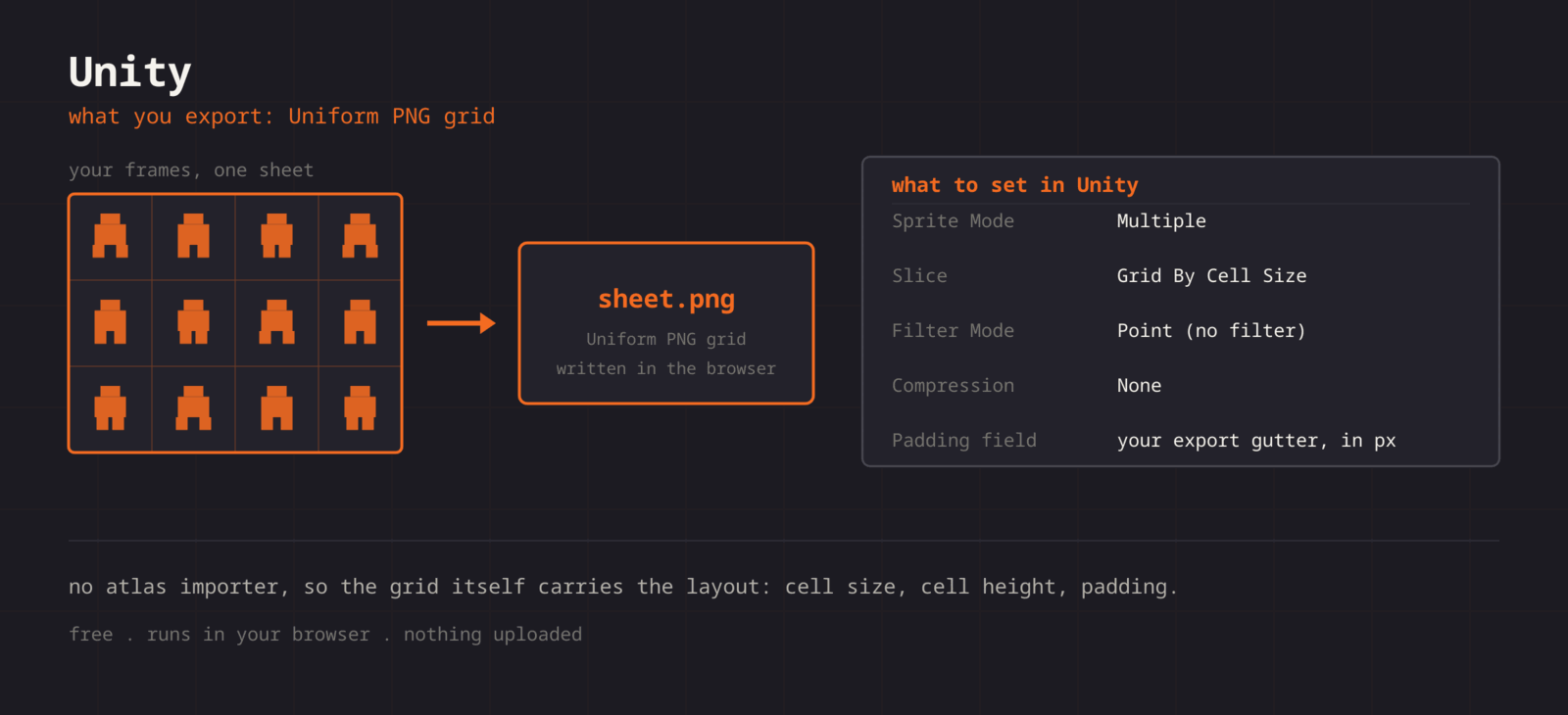
Unity has no import path for third-party frame data, so the sheet itself carries the layout. Export a PNG where every cell is the same size and the spacing is consistent, and Unity's Grid By Cell Size slicer reproduces your frames exactly. Note the cell width, cell height, and padding shown in the editor before you export, because you type those three numbers into the Sprite Editor.
Getting the sheet into Unity
- 1
Export the PNG
Arrange your frames, keep the grid uniform, and export as PNG. Write down the cell size and padding.
- 2
Set Sprite Mode to Multiple
Drop the PNG into your project, select it, and in the Inspector set Sprite Mode to Multiple. This is what tells Unity the file holds many frames.
- 3
Kill the filtering
Still in the Inspector, set Filter Mode to Point (no filter) and Compression to None. Skip this and your pixel art comes in blurry.
- 4
Slice on the grid
Open Sprite Editor, choose Slice > Grid By Cell Size, enter your cell width and height, set Padding to your gutter, then Slice and Apply.
- 5
Make the animation
Select the sliced sub-sprites in the Project window and drag them together into the Scene. Unity offers to build an Animation Clip and Animator Controller. Adjust the clip Samples value to change the frame rate.
| Setting | Unity value |
|---|---|
| Slice mode | Grid By Cell Size |
| Sprite Mode | Multiple |
| Filter Mode | Point (no filter) |
| Compression | None |
| Padding field | Your export gutter, in pixels |
Uniform cells by default
Every frame lands in an identically sized cell, which is the one thing Grid By Cell Size needs to slice cleanly.
Padding you control
Set the gutter yourself and type the same number into the Sprite Editor Padding field. No guessing, no drifting frames.
Check timing first
Preview the animation at your target FPS in the browser before you build a single Animation Clip.
Straight PNG output
No proprietary container, no importer to install. Drop the file in Assets and Unity picks it up.
When the sheet fights Unity
Every frame after the first is shifted right
- Cause
- You exported a gutter but left Padding at 0 in the Slice dialog. Unity then treats the gutter as part of each cell, so the error accumulates across the row.
- Fix
- Type the exact gutter you exported into the Padding field, or re-export with spacing 0 and leave Padding at 0. Either is fine, they just have to agree.
Sliced sprites carry a sliver of the neighbouring frame
- Cause
- The cell size is off by a pixel, or Offset is not zero. Grid By Cell Size starts at the offset and steps by cell size plus padding, so a rounding error shows up on every frame.
- Fix
- Check that the sheet width divided by the column count is a whole number, set Offset X and Y to 0, and re-enter the cell size rather than trusting the value Unity remembered.
The generated animation plays far too fast
- Cause
- Dragging sliced sprites into the scene builds an Animation Clip at 60 samples, not at the frame rate you previewed.
- Fix
- Select the clip, switch the Animation window to the sample rate field, and set Samples to your target, usually 12. The clip keeps the same frames and slows to match.
Sprite edges flicker or bleed while the camera moves
- Cause
- Mip maps are on, or the sprite is being drawn at a fractional pixel position, so the sampler reaches into the neighbouring cell.
- Fix
- Turn Generate Mip Maps off in the texture importer, set Mesh Type to Full Rect, and add a Pixel Perfect Camera component or snap positions so sprites land on whole pixels.
The character sinks into the floor or spins around its stomach
- Cause
- Every sliced sprite gets a Center pivot by default, which is rarely where a character stands or where a weapon rotates.
- Fix
- In the Sprite Editor, set the pivot to Bottom for grounded characters, or to Custom and type the exact pixel. Do it before you build the animation, since the clip records the sprite reference and not the pivot.
The imported texture looks lower resolution than the file
- Cause
- Max Size defaults to 2048, so a sheet wider than that is scaled down on import without any warning.
- Fix
- Raise Max Size to at least the largest sheet dimension and set Compression to None. If the sheet is over 4096, split it per animation instead of raising the cap further.
What changes between Unity versions
- Unity 2019 through Unity 6
- The Sprite Editor slice workflow, Sprite Mode Multiple, and the importer fields have not changed across these versions. A sheet exported today imports the same way in an old LTS project and in the current release.
- 3D template projects
- The Sprite Editor lives in the 2D Sprite package. In a project started from a 3D template it may not be installed, and the Sprite Editor button simply will not appear. Add 2D Sprite from the Package Manager first.
- Universal Render Pipeline
- URP changes materials, not sprite import. Filter Mode, Compression, and slicing behave identically. For crisp scaling, add the Pixel Perfect Camera from the 2D package rather than changing the sheet.
- Unity Sprite Atlas
- Unity can pack your already-sliced sprites into its own Sprite Atlas asset for batching. That is a build-time optimisation layered on top of the sheet, so keep this export as the source art and let Unity repack it.
Want the long version? Read the engine import guide, or see every export format.
Export for Unity
Pack your frames in the browser. What you walk away with: Uniform PNG grid, ready for Unity.